Hi George,
Thank you for linking the post describing the process to create new App Connect extensions. I have followed the post and npm example, but the custom component is not appearing in the AC list.
I think the reason it is not working is because node_modules folder doesn't exist in the project. I'm running Docker for local development, and it doesn't create node_modules folder. Based on this response to JonL, I understand that the AC extensions need to be installed locally in node_modules and create a symlink to the extensions folder.
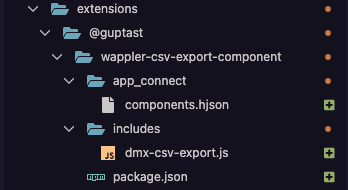
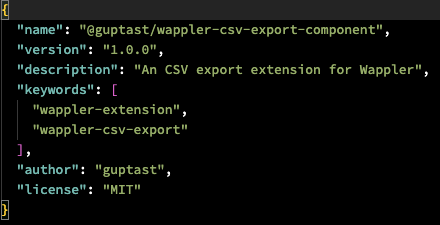
How do i get an AC extension to work when node_modules folder doesn't exist? The folder structure, main package.json, extensions package.json and Project Options have been setup like this:
Folder structure:
extensions package.json
Entry in the project.json
    {
      "name": "file:extensions/@guptast/wappler-csv-export-component"
    }
  ],
Entry in the main package.json "extensions": "file:extensions"