I'm facing two challenges and I'd appreciate your help.
I have an input field with Tagify configured as follows: Dropdown Position is set to All, Mode is Select, and in Display Options, only No custom is enabled.
Here are my difficulties:
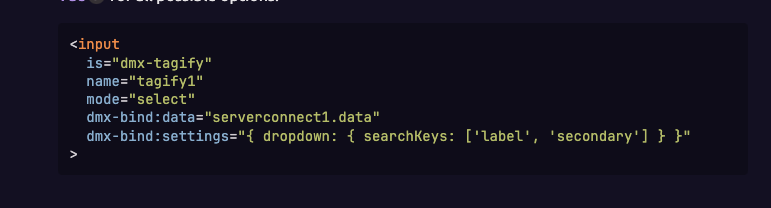
Searching across two fields: My field uses a Text Field and a Secondary Field. I'd like to be able to search using both, but it only works on the Text Field. The only solution I've found so far is to concatenate the information, which isn't ideal.
Inserting a non-existent item: I need the value to be automatically inserted into the database if it isn't found in the search results. However, the field currently treats the data as invalid or empty.
Any suggestions would be greatly welcome. Thank you!
Searching in the secondary field is currently not supported, but Inserting non-existing item is possible. First of all you need to disable the no custom option, as it disables entering custom/non-existing tags.
Check the following tutorial to learn how to add non-existing tags into the database:
Dear Teodor, I hope this message finds you well.
Thank you for the guidance provided earlier. The implementation regarding the insertion of new tags in Tagify has already been successfully resolved.
However, I now need to perform searches based on the value contained in the Secondary Field. I would like to know if there is any way to achieve this through additional methods, even outside of the native functionalities available in Wappler.
Thank you in advance for your attention and support.
As of now we can't search or filter data in secondary field. Maybe in future updates we can see this functionality (if it's in the road map of Wappler development)