Hi.
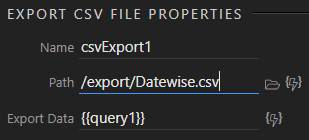
I have generated a CSV using Export CSV File server action successfully. Now I need help with two things:
How to name the CSV file dynamically? I had to create a local file just to get the Path select file window to work, but I can’t seem to understand how to name it dynamically using bolt icon.
How to automatically initiate a download after server action success and delete the file on server once download completes?
I’ve only exported files with names which are a mixture of static and dynamic, but I expect the same would apply, eg: /admin/backups/items_{{TIMESTAMP.formatDate("yyyy-MM-dd HH-mm")}}.csv
On a successful export, you could execute a second server action. I have used dynamic names for deleting files, eg: /admin/backups/{{$_POST.filetodelete}}
File is getting downloaded when using GOTO function of browser component, but I get this warning message in Chrome. Resource interpreted as Document but transferred with MIME type text/csv
This is because browser.goto tries to redirect the page itself, but Chrome is smart enough to recognize the contents of the URL as a file and hence downloads it. Any suggestions to avoid this?
I think Firefox is perhaps even smarter; it knows the URL is a file and downloads it - without any redirecting or error messages.
As far as I can see, the issue with Chrome is that a warning - not an error - is shown in the dev tools console. I wouldn’t have thought this was too much of a problem. I don’t know if there is a way of resolving this in Wappler. Perhaps you could redirect to a PHP file which would set the headers to prevent the warning, and download the file.
Once you have generated the file on the server, just redirect the browser component to the path of that file.
Eg: Your newly created file is stored at yourdomain/files/download.csv. On success dynamic event of the server form or server connect (whichever you are using on the web page), select browser.goto action and set the full path or relative path as '/files/download.csv'.
Ok, got it figured out. I had not checked the Output checkbox in the file export action step. That’s why I wasn’t seeing where I could bind the filename to the button. Then I added a Hyperlink and set it’s value to the file export name in the Server Connect action. Works great…
I tried using the (mixture of) static/dynamic name for my export, but it generates a server error…
Wappler will not let me save this exact code:
‘/exports/{{TIMESTAMP.formatDate(“yyyy-MM-dd”)}}_gebruikers_1-week.xls’
It changes the code on save to:
‘/exports/{{TIMESTAMP.formatDate(“yyyy-MM-dd”)+’_gebruikers_1-week.xls’}}’
I am sure there is a different format to use a mixture of static and dynamic names.
Any idea whats wrong with it?