Error while joining tables asp.net. - "Multi-part identifier cannot be found"

Using 3.8.2 with ASP.NET/MS SQL Server
I am trying to add a join in the query designer and keep getting errors, no matter what table I try to join to.
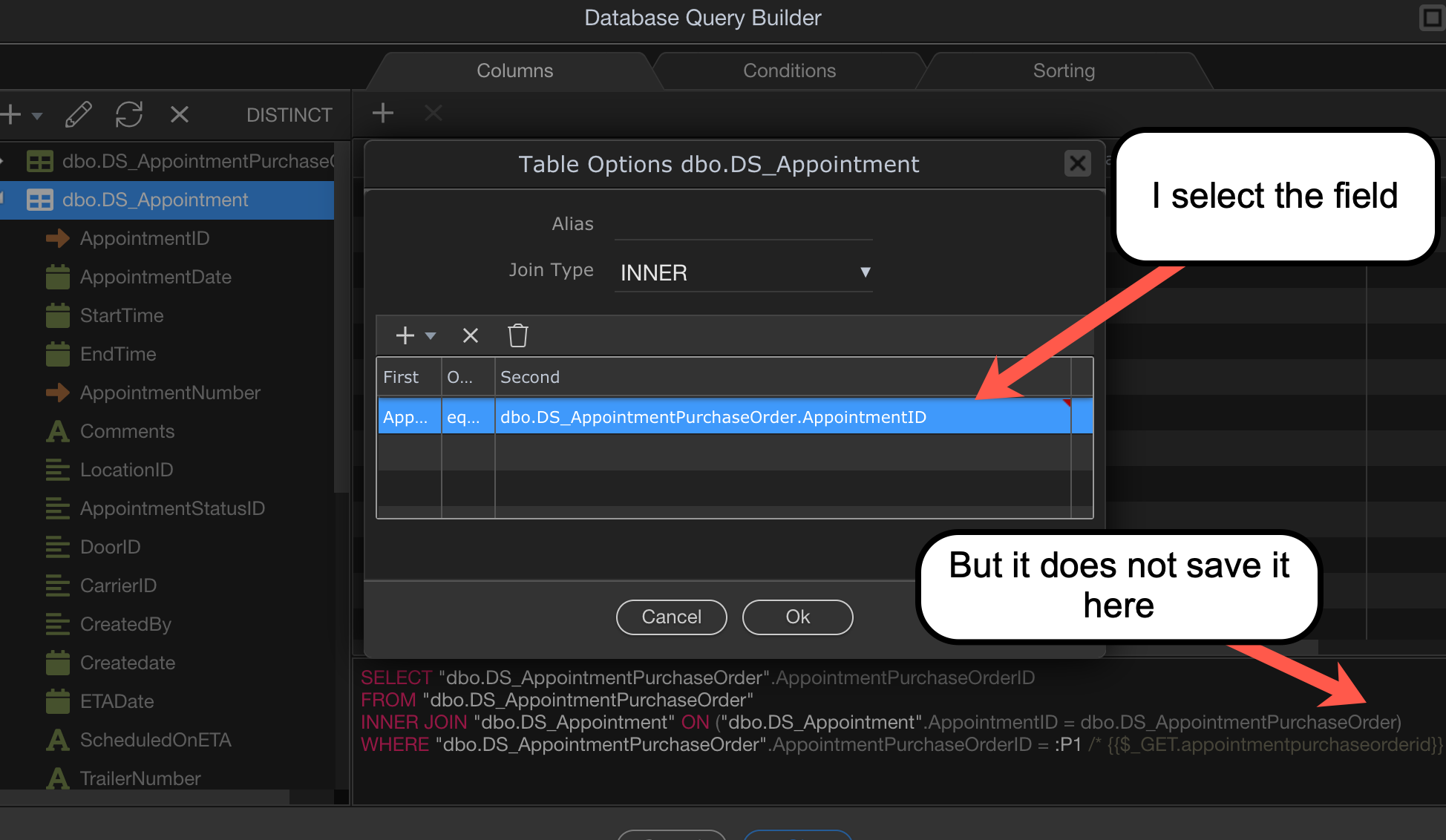
When I look closer at the query builder window, I notice when I select the second table field, it does not retain my choice. Even in the query builder window it shows the table name, but not the field.

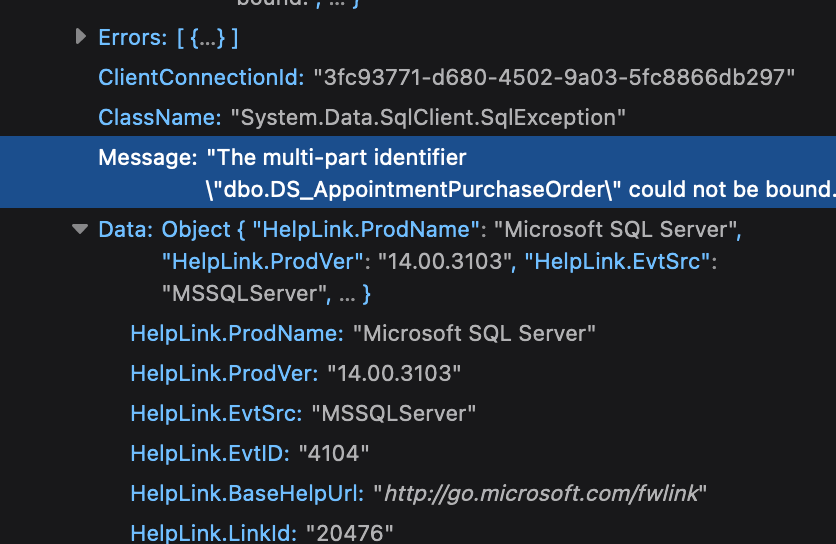
And here is the error I get in the browser:

This has me at a stand-still.

@patrick, any ideas?

Could you check in the json of the action file what it did generate. The query in the query builder is only for feedback to the user to see what kind of query is being generated, it is not the actual query being used on the server, there is uses the json to build a new query specific for the server it is running on.

Sure. This is just a simple query returning one field, same join parameters as the screenshot before.

  "meta": {
    "$_GET": [
      {
        "type": "text",
        "name": "appointmentpurchaseorderid"
      },
      {
        "type": "text",
        "name": "sort"
      },
      {
        "type": "text",
        "name": "dir"
      }
    ]
  },
  "exec": {
    "steps": {
      "name": "qScoreItemDetails",
      "module": "dbconnector",
      "action": "select",
      "options": {
        "connection": "TGTScoreCardV2",
        "sql": {
          "type": "SELECT",
          "columns": [
            {
              "table": "dbo.DS_AppointmentPurchaseOrder",
              "column": "AppointmentPurchaseOrderID"
            }
          ],
          "table": {
            "name": "dbo.DS_AppointmentPurchaseOrder"
          },
          "joins": [
            {
              "table": "dbo.DS_Appointment",
              "column": "*",
              "type": "INNER",
              "clauses": {
                "condition": "AND",
                "rules": [
                  {
                    "table": "dbo.DS_Appointment",
                    "column": "AppointmentID",
                    "operator": "equal",
                    "value": {
                      "table": "dbo",
                      "column": "DS_AppointmentPurchaseOrder"
                    },
                    "operation": "="
                  }
                ]
              }
            }
          ],
          "wheres": {
            "condition": "AND",
            "rules": [
              {
                "id": "dbo.DS_AppointmentPurchaseOrder.AppointmentPurchaseOrderID",
                "field": "dbo.DS_AppointmentPurchaseOrder.AppointmentPurchaseOrderID",
                "type": "string",
                "operator": "equal",
                "value": "{{$_GET.appointmentpurchaseorderid}}",
                "data": {
                  "table": "dbo.DS_AppointmentPurchaseOrder",
                  "column": "AppointmentPurchaseOrderID",
                  "type": "text"
                },
                "operation": "="
              }
            ],
            "conditional": null,
            "valid": true
          },
          "query": "SELECT \"dbo.DS_AppointmentPurchaseOrder\".AppointmentPurchaseOrderID\nFROM \"dbo.DS_AppointmentPurchaseOrder\"\nINNER JOIN \"dbo.DS_Appointment\" ON (\"dbo.DS_Appointment\".AppointmentID = dbo.DS_AppointmentPurchaseOrder)\nWHERE \"dbo.DS_AppointmentPurchaseOrder\".AppointmentPurchaseOrderID = :P1 /* {{$_GET.appointmentpurchaseorderid}} */",
          "params": [
            {
              "operator": "equal",
              "type": "expression",
              "name": ":P1",
              "value": "{{$_GET.appointmentpurchaseorderid}}"
            }
          ]
        }
      },
      "output": true,
      "meta": [
        {
          "name": "AppointmentPurchaseOrderID",
          "type": "text"
        }
      ],
      "outputType": "array"
    }
  }
}```
I see that the condition for the join is indeed wrongly generated. I will see if I can find the bug within Wappler, here the part of the json that needs to change to make it work.

          "joins": [
            {
              "table": "dbo.DS_Appointment",
              "column": "*",
              "type": "INNER",
              "clauses": {
                "condition": "AND",
                "rules": [
                  {
                    "table": "dbo.DS_Appointment",
                    "column": "AppointmentID",
                    "operator": "equal",
                    "value": {
                      "table": "dbo.DS_AppointmentPurchaseOrder",
                      "column": "AppointmentID"
                    },
                    "operation": "="
                  }
                ]
              }
            }
          ],

Did you also try to just delete the incorrect condition and add a new one?

Thank you Patrick. I’ve tried all types of joins, different tables, deleting and adding new ones, new server connect files, etc. That’s why this query is simple, just trying to narrow down the issue.

v3.8.3 / ASP.NET / MSSQL

I have come across the same issue when creating INNER JOINS between two tables. The SELECT query shows the second table correctly but it does not save the field name.

The JSON file is created with the missing field name. The DB Query works okay once the JSON file has been manually edited.

Any chance this can be corrected in the next update?

I’ve seen the same thing. If you add an alias name then it will work.

Another bump to hopefully get this fixed in the next update. Every time I have a server action with a join in it and I make a change I have to edit the code. It’s adds another step and takes time. Shouldn’t have to do it.
By the way it’s in Node.js also, not just .net.

@patrick will check it out

1 Like

Just another bump on this. It’s not really a major bug (although you should be able to do a simple join) but more of a hindrance.

Another bump to get this bug fixed.

This has been fixed in Wappler 3.9.7

1 Like

This topic was automatically closed after 32 hours. New replies are no longer allowed.