mbsrj
September 18, 2025, 4:59pm
1
======== TEMPLATE BUG FORM ========
Wappler Version : 7.3x
The problem is that when data is sent without dynamic input data, regardless of the variable format 'snake_case', 'camelCase' or 'pascalCase', the api sends a variable instead of the actual value.
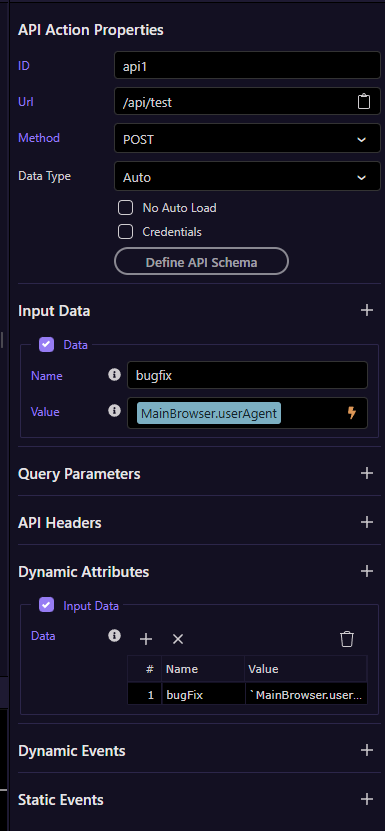
Create a new dmx-api-action:
Static Input data and Dynamic Input Data
Create api endpoint for view received input data…
So, view the ‘bugFix’ sended data in Payload:
Green circle is: default input data
Red circle is: dynamic input data
George
September 18, 2025, 5:44pm
2
You can just use the dynamic attribute for input data, those are case sensitive.
Just remove the regular input data (dmx-param)
We will be deprecating those indeed in favor of the dynamic multi value attributes exactly for the reason you mention.
mbsrj
September 19, 2025, 12:14am
3
Please, review the image… I dont use dmx-param… I’m using this:
The problem is in: dmx-bind:data*
George
September 19, 2025, 6:30am
4
Could you paste the generated html code of the api action?
mbsrj
September 19, 2025, 2:14pm
5
Example:
<dmx-api-action id="api1" noload="true" dmx-bind:data="{georgeWappler:`MainCookieManager.data._session_id`}" url="/api/core/test" method="post" data-type="json"></dmx-api-action>
George
September 19, 2025, 2:23pm
6
yes that should be fine, but in your usage above you had bugfix twice, so that is why it is send twice. You should add it only in the dynamic attributes input data
mbsrj
September 23, 2025, 12:55am
7
George, if you can, ask someone on your team to test it. Because it doesn't work here. I've already tested it a lot!
This example here is not working:
<dmx-api-action id="api1" dmx-bind:data="{testKey:`MainCookieManager._testKey`}" method="post" url="/api/core/testing"></dmx-api-action>
It's impossible to send a data with a variable in camelCase... I'm not crazy or lost... If you can, check it or ask someone to check it. If it doesn't work anymore, please let me know.
franse
September 23, 2025, 1:08am
8
I can confirm there's an issue with the `
Having this:
<dmx-value id="var1" dmx-bind:value="12"></dmx-value>
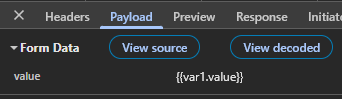
<dmx-api-action id="api2" method="post" url="http://localhost:5000/api/test/testapi1" dmx-bind:data="{value:`var1.value`}"></dmx-api-action>
Sends:
If I change directly in the code (deleting `):
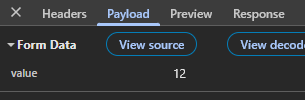
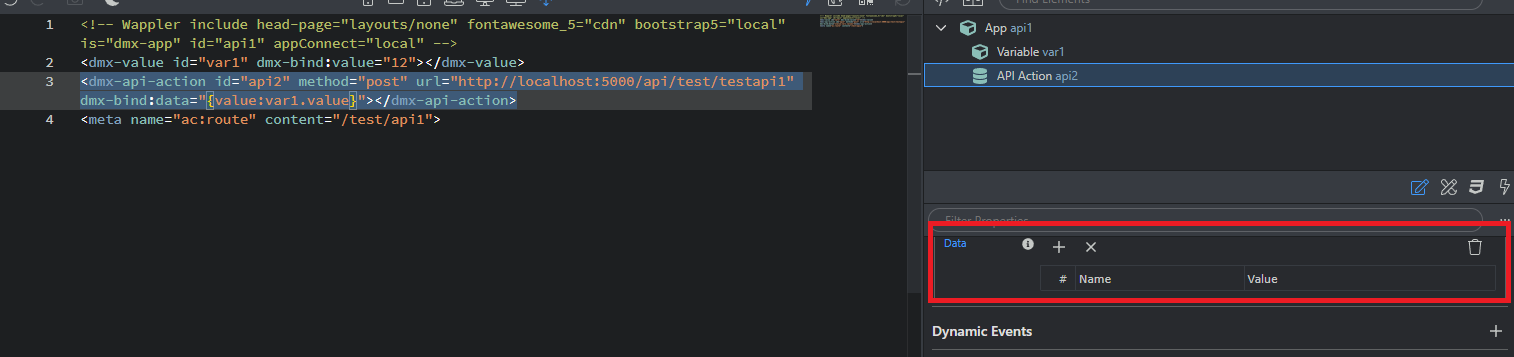
<dmx-api-action id="api2" method="post" url="http://localhost:5000/api/test/testapi1" dmx-bind:data="{value:var1.value}"></dmx-api-action>
The data is correctly sended:
But dissapears from the UI:
franse
September 23, 2025, 1:10am
9
I guess @mbsrj your solution is remove the `
So you'll have:
<dmx-api-action id="api1" dmx-bind:data="{testKey:MainCookieManager._testKey}" method="post" url="/api/core/testing"></dmx-api-action>
But won't be visible on the UI
mbsrj
September 23, 2025, 3:29am
10
Yes, that's the correct configuration. Thank you for your attention. Now we just have to wait for the Wappler team to update it... @George
system
September 27, 2025, 3:39pm
15
This topic was automatically closed 2 days after the last reply. New replies are no longer allowed.