So I have created a nice set of 4 actions which are triggered when I successfully add a contact to the database. All is working well.
Then I realise I want to change the id of an item involved - in this case, the id of the modal to be closed upon success (from model_add_contact to m_add_contact). So I make the change to the modal, but then I need to change the action too.
Can I change the id of the modal by editing the “hide” entry in the action list?
If I have to delete the existing “hide” entry in the action list which was at position 2, then the new one I add will be at position 4. Can I move it to position 2? Or do I have to delete all the actions in between and re-enter them?
I ask as I cannot see a clear way to achieve either of these tasks!
This sounds like a slightly fiddly method - and generally, somewhat error-prone.
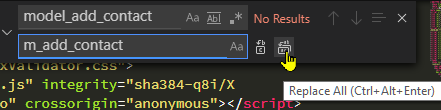
I would press Ctrl+H, enter the old and new IDs and Replace All:
You might want to check before clicking Replace All, but given you have a clear naming convention, this is probably not necessary. Generally when changing IDs etc., things can easily break of course, so searching for the relevant terms so you don’t miss one is a good idea.
The same goes of course to making changes such as table names, which could affect multiple files - in which case you would use the global search/replace (Ctrl+Alt+F).
Global search and replace (across multiple files) would certainly have to be done with much care but very useful for checking terms etc. in context, before making any changes. But search/replace on a single page is not usually much of an issue and something I do quite frequently.