Websockets make for an amazing user experience, so I use them often.
However, my app is multi-tenant, so when emitting or broadcasting messages, I have to evaluate if that message should be acted upon. It works, but not ideal.
Namespace is the preferred method to handle this however in Wappler, those are static not dynamic.
It would be great to have dynamic bindings on namespaces so we can limit traffic by tenant.
The socket endpoints and namespaces are created on application startup where the only dynamic data that can be used is $_ENV. Where do you store the tenant information?
A session id is set in the layout load, which is then used throughout the app to identify the tenant. Tenant data is stored in the db as new tenants are created regularly through signup process. Tenant is assigned by domain in use.
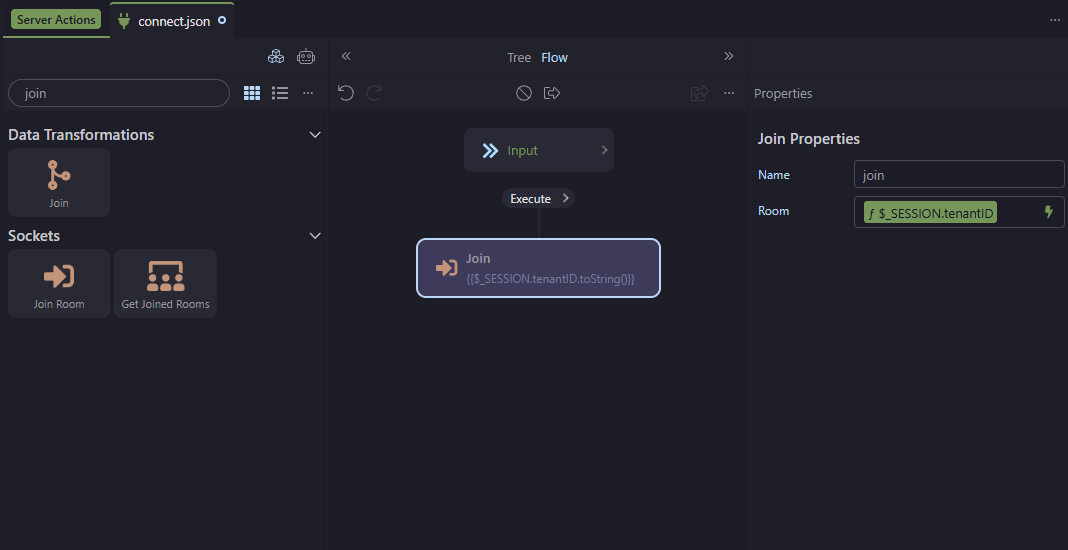
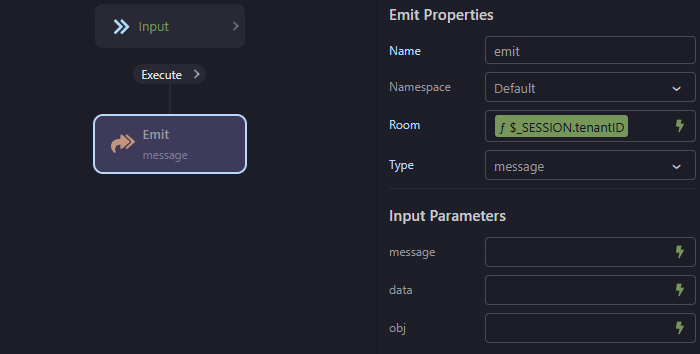
Why not use rooms instead of namespaces. In the connect you identify the user and join the room for the specific tenant and leave the room on disconnect. You can then send messages to the specific room and only that tenant gets the messages.
Can rooms be used to emit messages for refreshing data in the UI?
I'm interested in learning how rooms can be used to send messages to specific rooms. Could you please point me to any documentation on how to configure this?
As an example, I have used this to upload an image taken on a mobile phone. Once the data has changed in the desktop app, the data refreshes in the browser
A room is like a chat group where users can join, sending a message to that room will only be visible to the users that joined that room. Users can join multiple rooms, you can use it to group them together.
The socket messages are triggered as events on the client, you can reload data, run flows etc. on them. You can also pass data with the message event to the client and use that in your flow.
The document only explains how to refresh data on the client-side for all logged in users. What I need is a way to refresh data for all users logged in under the same tenant ID.
At the moment, I'm doing this by creating sockets for individual APIs, emitting a message within each API, and then checking the tenant ID on the client side. This approach works but it soon becomes complex in a larger project where tens of APIS may be emitting messages.
That's why I believe connecting and disconnecting users to a room to emit messages is a a much better solution in terms of maintainability and efficiency.
So far, I haven't come across any documentation that describes this process from start to finish.
In the Sockets section make sure you have a connect and disconnect action.
The connect action simply needs to contain the Join Room step. You can access $_SESSION and $_COOKIE within socket actions, I noticed they are currently not available in the picker but we will add them. Users can join multiple rooms, so you could make a room based on tenant ID or for example an admin group.
Rooms don't show up in the picker since they are dynamic and you choose the name of the rooms.
You have to define an action for the message type, it will then show in the dropdown.
Having to create an action for the message can be a bit strange but is to setup which params are being used, it is so that the sockets client component has a list of available messages it can listen to and which params it has so that you can pick them and assign them.