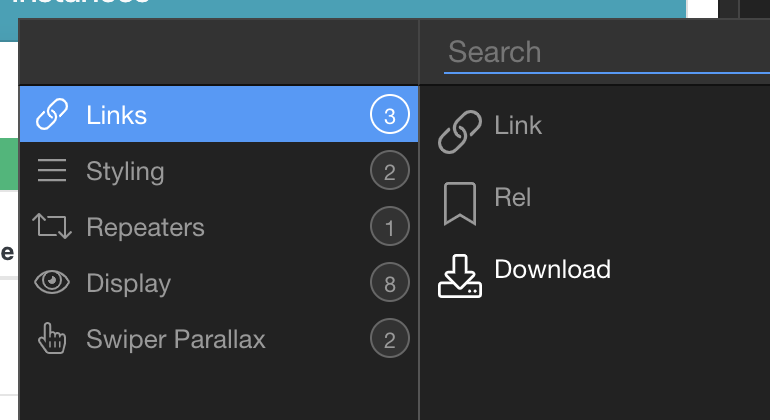
I am looking to set up downloads where the source is a filename stored in a database table field.
This is because the downloads will be a long list (eventually)
The download component doesn’t seem to support dynamic sources?
Basically i want to set up the source as something like ‘/assets/downloads/’+{{filename}}
Yes, i want to activate a download named in a dynamic source within a click event on items in a bootstrap table. So each item in the table links to a different dynamically named file
Here is the idea. Clicking on a row should download the file but the dynamic click event does not allow for a dynamic source )or maybe i just hacve this all wrong, never used this component before
Hello sir was hoping you can help me with this same dilemma. I have tried using the app connect download and doesn’t work correctly and then saw this topic. When i add a server connect download to my existing query it causes the page to not display. Wish there was concise tutorial on how to download an image from a repeat. If you could possible walk me thru this i would appreciate it and I’ll make the tute myself.
The download link on the page has to be an <a> tag, not a mouse click action. Set the href to the SC script (use a route if you want to make it look better) and send the data via the URL (fileid for example).
Still sorry - appreciate the feedback, but not grasping this one at all. The button is an anchor button with an < a > tag, and haven’t even gotten to that point of adding a click attribute - when the page itself doesnt display when i add the file download to the server side. that is why i added the link to my p[age so you can see it is not there. Any detail info you can give me?
Does the listsocial[0].ImgLrg variable contain the whole path to the file? If not, you should add the path before it. If it does, are you sure it’s correct?
Yes it does. I am writing the whole path to the database. I have since taken off the button and server connect and just used the old right click to save image instructions. But would really like to know how to get this to work right for some other bigger jobs I have on the table.
THANK YOU VERY MUCH! No where can you find it said as simple as you put. Which unfortunatley now brings me to an error that happens. Shows the correct file names but give me an error: failed - forbidden and will not download the images…whats up with that? No restrictions set on the server folders and don’t have any security enforcement on the page.
I’m glad we got part of your issue figured out anyways.
Your link to your page seems to be no longer working. But I assume the issue you are having now may be path related. Just for kicks (and testing) add another ‘dynamic attribute —> Links —> Link’ to your button. If your path is correct it should load the image in your browser.
Brad thank you again and I had made some changes late before leaving and that is why you saw no page. Nonetheless i would like to add to this post what actually happened and what I discovered works. I did not need to create a route - i did not have to setup a download in server connect - i did not have to use the stand alone download component in app connect. WHAT I did do was as simple as Brad posted. I created an anchor button (which is not easy to find) it is within the forms section but will not appear unless you click outside of any tag and add there, then you have to copy it in code view and place it where you want it. After doing that I merely selected the anchor button, went to dynamic attributes and added Links > Download and used the dynamic selector for my database image (which has the full path in it - if you do not have the full path you will have to type this in front of the variable you select within the dynamic selector). HERE IS THE TRICK - after doing that I checked my page and the download seemed to be working, bringing down the correct image by name in a repeat div, but kept getting an error saying “failed-forbidden”. I double checked my path in DB and was correct, everything was correct. THEN this morning Brad offered a suggestion to double check on my paths by telling me to add another dynamic attribute and this time setup as LINK > LINK and then again add in the dynamic selector for my image column AND low and behold it then worked properly. No more errors. SO YOU HAVE TO ADD BOTH DOWNLOAD AND LINK to the dynamic attribute of the anchor button for it to work correctly! Without the download the image just displays in the web browser. Again thank you Brad.