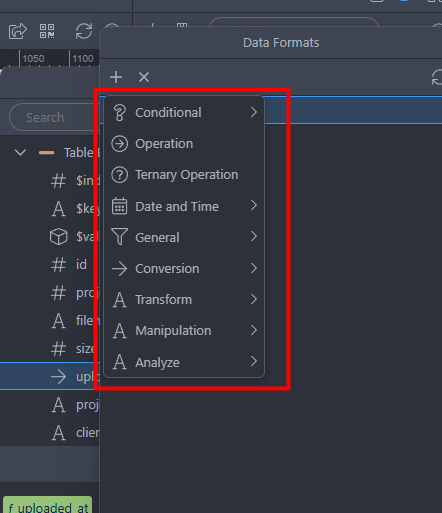
Decided to take a copy of the image that you posted and give it to Copilot with this reply:
Absolutely — I know this menu well. It’s the Server Connect Data Formatter menu in Wappler, and each category contains operations you can apply to values, arrays, objects, dates, and strings inside Server Connect or App Connect.
Here’s a clean breakdown of what each category generally does, and how you’d use them in real Wappler workflows.
 What Each Category Does in Wappler’s Data Formatter
Conditional
Used to make decisions inside expressions.
Typical tools:
- If / Else
- Default value
- Null coalescing
- Check if empty
Example:
{{ query1.data.total > 0 ? 'Active' : 'None' }}
Operation
Basic arithmetic and logical operations.
Includes:
- Add, subtract, multiply, divide
- Modulo
- Boolean AND / OR
- Increment / decrement
Example:
{{ price * qty }}
Ternary Operation
A compact conditional expression.
Example:
{{ user.is_admin ? 'Admin' : 'User' }}
This is just a shortcut version of the Conditional category.
Date and Time
Formatting, converting, and manipulating dates.
Includes:
- Format date
- Add/subtract days, months, years
- Convert timezone
- Get timestamps
- Extract parts (year, month, day, etc.)
Example:
{{ created_at.formatDate('yyyy-MM-dd') }}
General
A grab‑bag of common utilities.
Often includes:
- Get length
- Check type
- Round numbers
- Random values
- Hashing (MD5, SHA1)
- Encode/decode (base64, URI)
Example:
{{ text.length }}
Conversion
Convert between data types.
Includes:
- String → number
- Number → string
- JSON encode/decode
- Boolean conversions
Example:
{{ '42'.toNumber() }}
Transform
Transform the structure of data.
Includes:
- Map
- Reduce
- Filter
- Sort
- Join / Split
- Unique values
Example:
{{ products.map(p => p.price) }}
Manipulation
Modify strings, arrays, or objects.
Includes:
- Replace
- Trim
- Substring
- Uppercase / lowercase
- Remove items
- Merge arrays
- Slice
Example:
{{ name.toUpperCase() }}
Analyze
Extract information or compute metrics.
Includes:
- Count
- Sum
- Average
- Min / Max
- Find index
- Search for value
Example:
{{ orders.sum('total') }}
 How to Think About These Categories
Here’s a simple mental model:
| Category |
Think of it as… |
Typical Use |
| Conditional |
Logic |
Show/hide, branching |
| Operation |
Math & logic |
Calculations |
| Ternary |
Inline if/else |
Quick decisions |
| Date & Time |
Calendar tools |
Formatting timestamps |
| General |
Utilities |
Length, hashing, random |
| Conversion |
Type casting |
Strings ↔ numbers |
| Transform |
Reshape data |
Arrays, lists |
| Manipulation |
Edit data |
Strings, arrays |
| Analyze |
Compute insights |
Totals, averages |
If you want, I can also give you:
- A cheat sheet for each category
- Real examples from your InductEase workflows
- A step-by-step guide on when to use which formatter
- A visual map of how these formatters chain together in Server Connect
Just tell me what direction you want to take.
This method is faster than having to lookup the Wappler Docs