We have noticed an issue with Docker and Traefik. Acknowledged here if anyone else is having issues:
Certificates are not created as an outdated API version is being called so for now have to roll back to the previous Docker version (until resolved) if you want to generate a certificate.
Does Wappler need updating to support the release of Traefik 3.6.1, not sure if the older version is hard-coded somewhere? I'd have thought the latest version should have pulled upon deployment but did not?
I haven't come across this issue or any error in any of my projects that have been deployed via Docker and use Traefik v2.5 for SSL certificates. The VPS are running Ubuntu 24.04.
You can check the traefik version installed on the server in the docker-compose.yml file. This is the file path in my project (under hidden folder) for a custom server.
Has only been in the past week or so as have deployed multiple Projects recently without a single issue. The final Project was the one to display the issues (which I deployed yesterday). Everything aside from the domain name is exactly the same, Node, Docker, Digital Ocean, as the prior successful Project deployments. The Traefik console was full of deny errors due to API level being too low. The error came about after the most recent Docker updates server side.
As per Co-Pilot, a breaking change was introduced in Docker v28.5.2 (the version that you installed on the server) in terms of its compatibility with Traefik versions < 3.
Traefik version 2.5.7, installed via wappler-compose > docker-compose.yml uses Docker API v1.24, where as Docker v28.5.2 requires minimum Traefik v3 (Docker API >= v1.44). I haven't come across this issue so far because my remote servers are currently running Docker v28.2.2, and this version is compatible with Traefik v2.5.7.
However, this will become an issue for all Docker deployments once a new version of Docker (v28.5.2 or higher) gets rolled out for installation on the servers by hosting providers.
This version runs fine @guptast I had to remap some ports (strange port conflict despite deleting all images so just mapped them) but all working and certificates were created and installed. Thankfully my other deployments certificates were all generated just a couple of weeks ago so am alright for the next two months and two weeks at least!
This is certainly going to be an issue in the future though.
We have temporarily disabled automatic updates for Docker across all of our droplets. As a precaution I also rolled them back as well. Now I know the fix works I'm not too concerned. Just hope it is rectified and no other issues are a factor as a result of future releases...
services:
  traefik:
    image: traefik:v2.0
    restart: always
    ports:
      - "8081:80"    # Remap HTTP to port 8080 (instead of 80)
      - "8443:443"   # Remap HTTPS to port 8443 (instead of 443)
    volumes:
      - "/var/run/docker.sock:/var/run/docker.sock"  # Enable Traefik to interact with Docker
    networks:
      - wappler-compose_proxy  # Ensure Traefik is on the same network as the other services
    command:
      - "--api.insecure=true"
      - "--entryPoints.web.address=:80"         # Web entry point for HTTP
      - "--entryPoints.websecure.address=:443"  # WebSecure entry point for HTTPS
      - "--providers.docker=true"  # Enable Docker provider for Traefik to discover services
      - "--certificatesresolvers.leresolver.acme.httpChallenge.entryPoint=web"  # Let's Encrypt HTTP-01 challenge
      - "--certificatesresolvers.leresolver.acme.email=your-email@example.com"  # Add your email for Let's Encrypt
      - "--certificatesresolvers.leresolver.acme.storage=/etc/traefik/acme.json"  # ACME certificate storage

  web:
    restart: 'always'
    stdin_open: true
    tty: true
    logging:
      options:
        max-file: '5'
        max-size: '10m'
    build:
      context: '../../../'
      dockerfile: '.wappler/targets/DigitalOcean/web/Dockerfile'
    labels:
      - 'traefik.enable=true'
      - 'traefik.docker.network=wappler-compose_proxy'  # Ensure this matches the network name
      - 'traefik.http.routers.some-name__digitalocean_web.entrypoints=web'  # HTTP entry point (port 80)
      - 'traefik.http.routers.some-name__digitalocean_web.rule=Host(`some-domain.com`)'  # Host rule for the domain
      - 'traefik.http.routers.some-name__digitalocean_web-secure.entrypoints=websecure'  # HTTPS entry point (port 443)
      - 'traefik.http.routers.some-name__digitalocean_web-secure.rule=Host(`some-domain.com`)'  # HTTPS rule for the domain
      - 'traefik.http.routers.some-name__digitalocean_web-secure.tls=true'  # Enable TLS for HTTPS
      - 'traefik.http.routers.some-name__digitalocean_web-secure.tls.certresolver=leresolver'  # Use the Let's Encrypt certificate resolver
      - 'traefik.http.services.some-name__digitalocean_web.loadbalancer.server.port=3000'  # Port of the service inside the container
      - 'traefik.http.routers.some-name__digitalocean_www_web-secure.entrypoints=websecure'  # HTTPS for www subdomain
      - 'traefik.http.routers.some-name__digitalocean_www_web-secure.rule=Host(`www.some-domain.com`)'  # Rule for www subdomain
      - 'traefik.http.routers.some-name__digitalocean_www_web-secure.tls=true'  # TLS for www subdomain
      - 'traefik.http.routers.some-name__digitalocean_www_web-secure.tls.certresolver=leresolver'  # TLS certresolver
      - 'traefik.http.middlewares.some-name__digitalocean_www-redirect.redirectregex.regex=^https://www.some-domain.com/(.*)'  # Redirect www to non-www
      - 'traefik.http.middlewares.some-name__digitalocean_www-redirect.redirectregex.replacement=https://some-domain.com/$${1}'  # Replace www with non-www
      - 'traefik.http.middlewares.some-name__digitalocean_www-redirect.redirectregex.permanent=true'  # Permanent redirect
      - 'traefik.http.routers.some-name__digitalocean_www_web-secure.middlewares=some-name__digitalocean_www-redirect'  # Apply redirect middleware
    networks:
      - wappler-compose_proxy  # Ensure the web service is on the same network as Traefik
    volumes:
      - 'user_uploads:/opt/node_app/public/temp_uploads:rw'  # Handle file uploads for the app

volumes:
  user_uploads: ~  # Define the user uploads volume

networks:
  wappler-compose_proxy:
    external: true  # Make sure the proxy network exists or create it manually
This was the thread that helped me out after searching through the log files for anything that gave a recent result as to what was going on. This then lead on to asking Gemini which created the above working config for me. Otherwise I'd have been still waiting for an answer on Stack...
I am so glad the days of using Stack Overflow are over... If there is one thing I am forever greatful to A.I for this is a big one (man that place is bitchy).
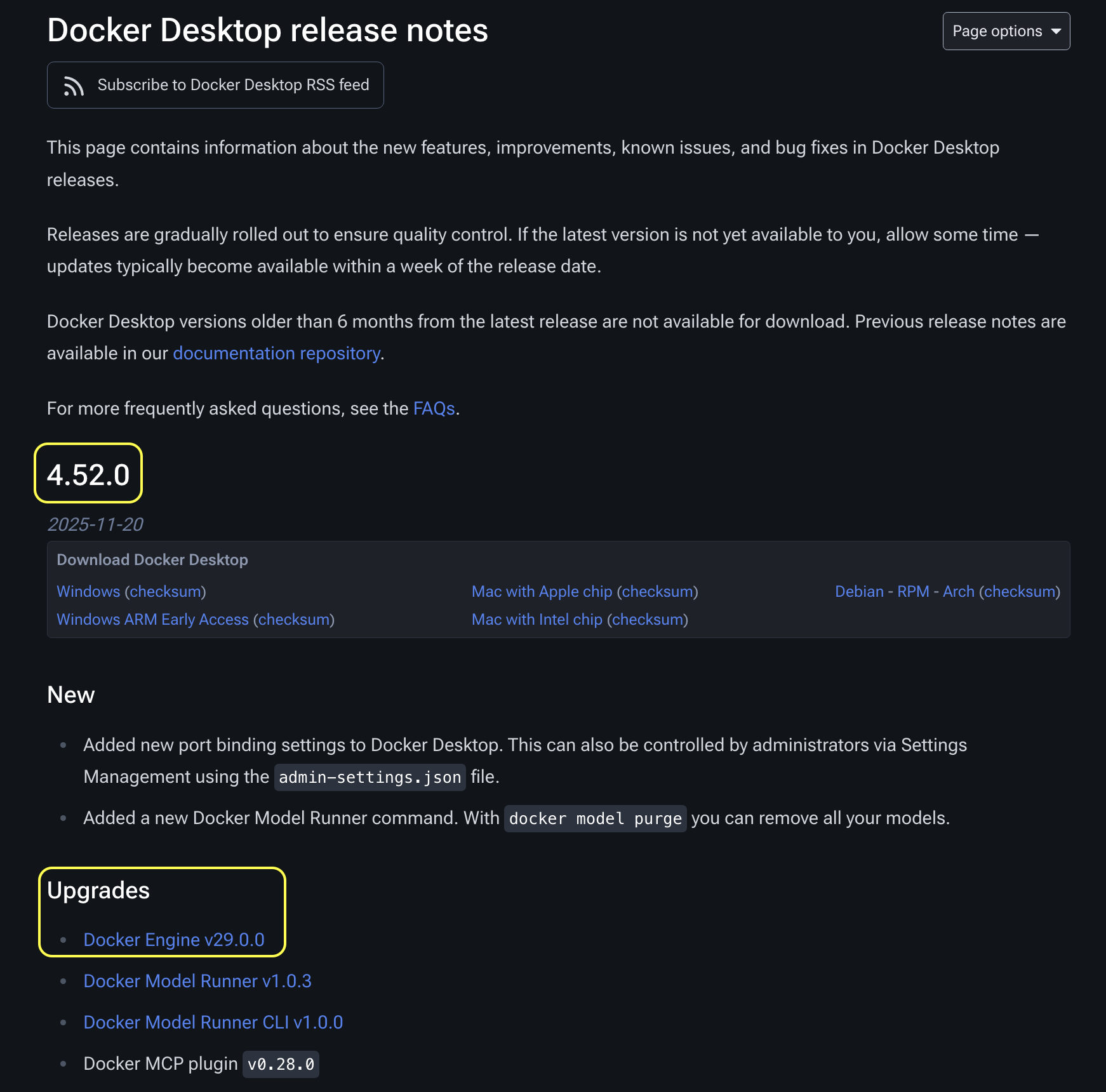
Docker has just released their latest Docker Desktop v4.52.0 (MacOS) with Docker Engine v29.0.0.
I don't know where the Docker Engine version is selected during the remote server setup and / or deployment process. The Docker Engine update can soon begin to cause Traefik errors on remote server project deployments unless Traefik version is updated.
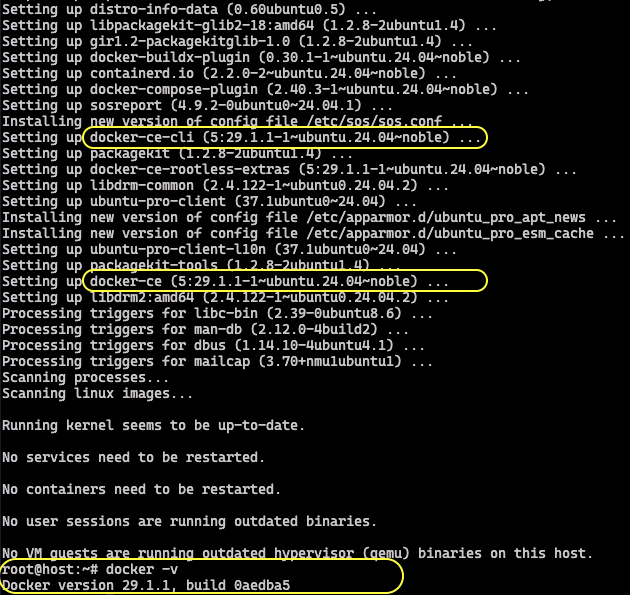
During routine server updates on cloud instances running Ubuntu 24.04, the system automatically installed docker-ce-cli v5.29.1.1 , which corresponds to the latest available Docker engine version (v29.0.0).
I had a similar problem this evening after my server used max cpu because of a data mining app that found its way into the server.
Digital ocean left docker ports open so I closed them with UFW and restarted the server.
That cleared the high CPU so I published the website from Wappler and just got a 404 error when trying to access the website and the traefik and portainer admins.
Found the error in the traefik logs about docker versions.
Fixed by changing the traefik version/image on the docker file to 2.11 (not 3* as that breaks everything).
Updated the traefik container and everything now works.