I know there have been related questions before, but I still can’t find a satisfactory solution. This is a general question but here is an example.
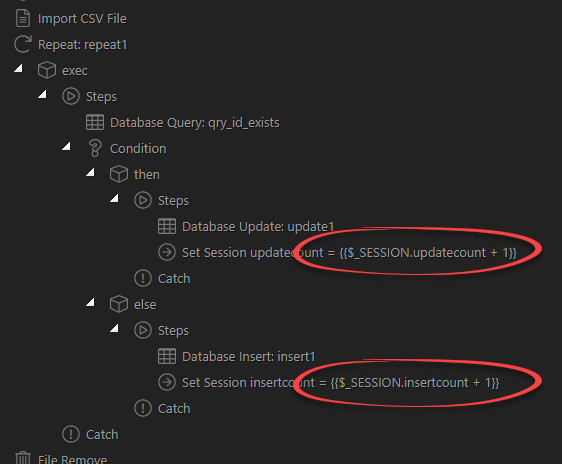
During an import process, some records are imported and some are updated. I put the relevant values into session variables like this:
I can display these values after the import, but only by echoing the session values with PHP, and using javascript to reload the page. The results is rather clunky: I want to show a notification following a successful import, but this in interrupted by the page refresh (which I would like to avoid anyway).
Is there a way within Wappler to display variables created in Server Connect in situations like this? I suppose I could store the values in a database, but that would be a rather complicated way to achieve what should be a simple task. I would be grateful for any suggestions.
Should that be a session?
You can use SET VALUE step instead, and enable output option. Then on the front end you can use the SET VALUE step value, as any other binding:
I tried using Set Value - where I put the session + 1 step - but the value would not increase. It worked for sessions, so I used them. Perhaps I was using the Set Value in the wrong way. I’ll try again.
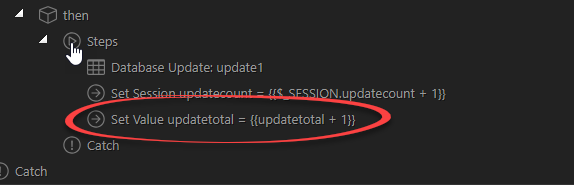
Great - I’m making progress. I’ve added curly brackets round the variable in server connect and now it’s incrementing. I couldn’t see a way of picking it and I had obviously entered it incorrectly. However, I haven’t managed to get it to display yet.
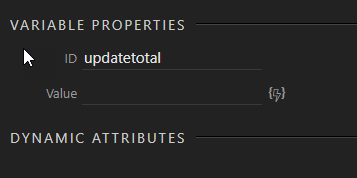
I’ve added the variable in server connect like this:
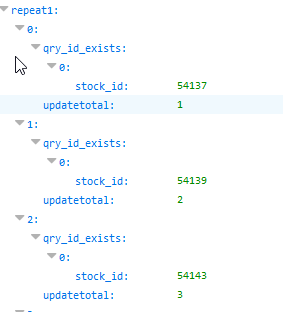
… and it’s incrementing correctly:
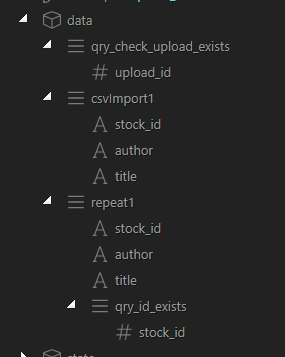
The server connect file is linked to a form in app connect. There is no sign of the variable under the form elements:
I tried adding an extra server connect file - the same one the form uses - but the variable doesn’t appear there either. I created a variable with the same name in App Connect:
… in case that was needed. But still no luck. What should I do to capture that value which is now being created correctly anyway?
The variable won’t appear in the data picker as it’s inside a condition and we don’t know what the condition result it.
You can just use it like: {{serverconnectName.data.setValueStepName}} on your page.
So it does not return any value on your page? Where have you used this - on the page directly or in some component?
There is no logical reason for it not to show anything on the page if you see it in the output json.
Edit: I now see it is in a repeat, maybe your expression is just wrong.
You can add a new variable, after the repeat(loop) step, which sums the updatetotal for each of the repeat steps.
Then use the total binding on the page.
I tried adding a new variable after the repeat, but am not sure what the expression should be here:
The value I need is the final value of updatetotal. I thought just assigning the new variable to this might work, but it doesn’t. I don’t know what I could try here.
Thanks - I’m sure I must be very close now. I don’t think I can quite choose what I need using the picker, but I arrived at this: {{repeat1.updatetotal.sum(repeat1.updatetotal)}}
… which isn’t quite right.
I have to collect a few daughters from a coach now, so shall have to stop for the moment. I really appreciate your help - particularly on a saturday night. I think you’ve earned a few beers by now.