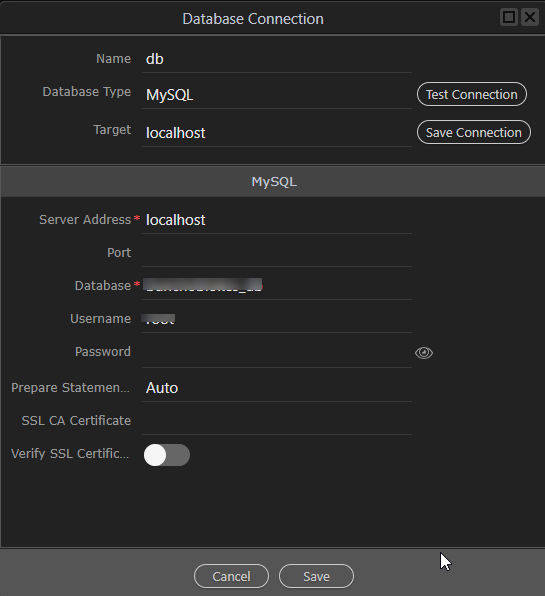
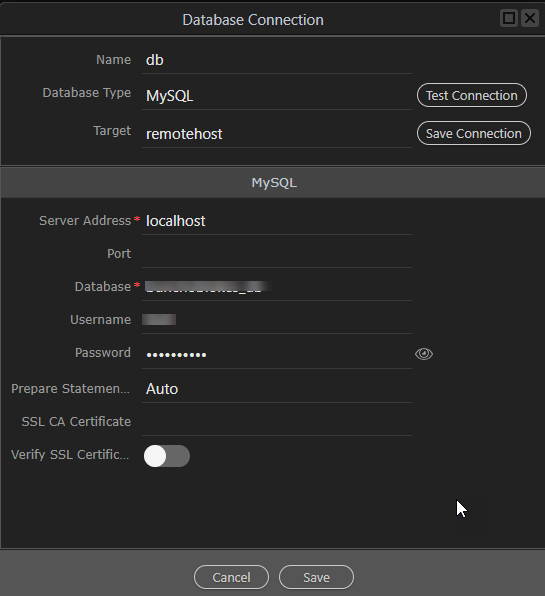
Different Databases Per Target?

I noticed in George’s demo today that he had different databases for development and production targets in his target settings. I don’t seem to have that option. My targets only have target details and ftp information.

How do I get separate databases for each target?

For localhost:

For the remote:

Thanks Ben! I have never noticed that target setting there before.

It’s new since a month or two maybe :slight_smile: now even more accessible in the new Database manager

It’s been 7 months since this post, but I can’t see that setting either. Is it me or did it disappear with the new (still experimental) SC UI?

What I am trying to do is the following:

  1. Setup a local Docker target, with default server connect connected db Database.
  2. Setup a remote target, cloud hosted with separate database server.

How can I configure this once in a way that all server actions use the correct db connection on the local and remote target?

@Emiel Have you ever figured this out?

Hi @karh,

I think just setting the correct database connection in the project’s target settings suffices, however I am not really sure since I didn’t test it myself, so please confirm if that works for you for my information :slight_smile:

Hmm sadly that didn’t work for me. Trying to set the external settings in the project settings will just make it try to connect to the docker db with those wrong credentials.