Also note that the deploy in the different targets, deploys only your file changes.
If you have database schema changes, next to the files deploy, you will have to go to the database manager and also apply the pending changes for each production targets.
We might streamline this process in the future and also ideally bind it to git as well, so you can mark a new version as new deploy. But also easy rollback.
That’s a good tip about only having one dev target. I do anyway, and it’s always a remote server and that makes it really easy to develop on two different computers (desktop and laptop) and use git to keep it all in sync. If I change anything in the database, for example, those changes are on the remote server used for development so is reflected on both devices. I guess the database manager would give me a similar solution, I just haven’t started using that yet.
I have a request related to this. With the potential complexity of targets, I wasn’t sure if this made sense, but it would certainly suit me; I always have just two targets - local/development and production. I expect this might be typical for many/most Wappler users.
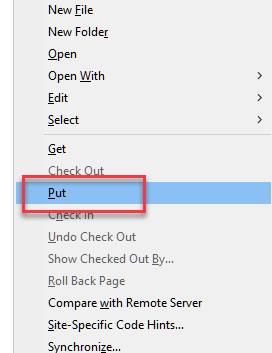
Most of the time, my development target will be selected. While using this target, there is an option to upload files (if I right-click a file). As far as I can see this doesn’t do anything (the files are being saved locally anyway). I would find it very useful if this option did do something - uploaded to my production target, rather than having to switch between targets all the time, just to upload files I’m working on.
I imagine this might not be feasible and I might have overlooked something in suggesting this. However, if it would be feasible and make sense, I’ll submit it as a feature request.
I appreciate that Dreamweaver didn’t/doesn’t have the options and flexibility of Wappler in this area, but, as far as I remember, it wasn’t necessary to think about targets all the time. You saved locally as you worked, and uploaded to the live server when you wanted. It seemed so much simpler.
We usually have a remote dev target. So the upload works fine there. And I would not want the upload option to suddenly start uploading to the target which has environment selected as production.
So for the usual 3 targets that we have - local, dev remote, prod remote - the upload functionality is fine in the current state.
Nor would I. The recent changes to saving/uploading were a great relief in relation to this.
I imagine - but of course don't actually know - that most or at least a good proporion of Wappler users have one development target (on their local machine) and one production target. For these users (like me), 'uploading' to the development target doesn't really make sense, and to switch target repeatedly, for uploading files, is an inconvenience. For such users, uploading only means and does only one thing, so to have to change settings each time to enable this facility ideally wouldn't be needed.
This is a bit risky to be honest. There should be a remote dev or staging server in between. Not required for small MVP-type projects, but for a relatively bigger project, just one remote environment is not really a good idea.
A great deal of care and testing etc is required when making changes to a website/project, however you do it. For large projects, I'm sure what you say is good advice.
As I said, I expect a lot of Wappler users have just two targets - perhaps most users. I've just launched my 10 year old copy of Dreamweaver. It seems you can only have two targets (at least in this version). A vast number of websites must have been created in Dreamweaver over the years, using this approach. Uploading was very simple:
(I'm reminded of my most-missed feature on this menu: Compare with Remote Server.)