Date formatting and binding

Hi Everyone,

I have an API which returns open slots in a calendar on a specific date, like below:

[{"st":"2020-07-21T09:00:00"},{"st":"2020-07-21T09:30:00"},{"st":"2020-07-21T10:00:00"}]

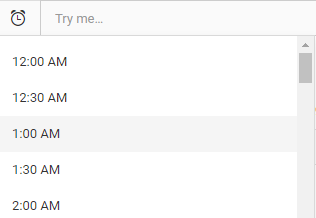
I would like to display this data in a select field, like below:

image

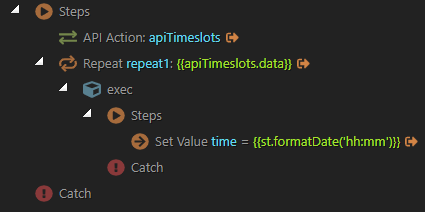
Any idea on how to configure the server connect action in order to return list with the available times formated. So far this is what I have and the formatting is not working, and when I try to bind with the select field, it is displaying undefined.

image

I am trying to bind the select field to the server connect action but it is showing undefined

Hello,
If your API returns the values as posted above, then you can bind your values directly, no need to create a repeat with a set value step.
So bind your data directly in the select and use the data formatter to format it as you need.

Hi Teodor,

Yes the API returns the values directly like below:

data: "[{"st":"2020-07-24T09:00:00"},{"st":"2020-07-24T09:35:00"},{"st":"2020-07-24T10:10:00"},{"st":"2020-07-24T17:05:00"}]" 

image

I tried binding the values directly to the select field but its not working for some reason.

image

The API is returning the values correctly from server connect. then on the select field I am binding the values like this:

dmx-bind:options="sc_timeslots.data.apiTimeslots.data" optiontext="st" optionvalue="st"

Can you please paste the whole code of your API response?

Sure.

    {apiTimeslots: {status: 200,…}}
    apiTimeslots: {status: 200,…}
    data: "[{"st":"2020-07-24T09:00:00"},{"st":"2020-07-24T09:35:00"},{"st":"2020-07-24T10:10:00"},{"st":"2020-07-24T10:45:00"},{"st":"2020-07-24T11:20:00"},{"st":"2020-07-24T13:00:00"},{"st":"2020-07-24T13:35:00"},{"st":"2020-07-24T14:10:00"},{"st":"2020-07-24T14:45:00"},{"st":"2020-07-24T15:20:00"},{"st":"2020-07-24T15:55:00"},{"st":"2020-07-24T16:30:00"},{"st":"2020-07-24T17:05:00"}]"
    headers: {date: "Thu, 23 Jul 2020 08:39:16 GMT", content-type: "text/html; charset=utf-8",…}
    access-control-allow-headers: "x-ts-ajax-request,x-ts-bp-action,origin,content-type,accept"
    cache-control: "private"
    connection: "close"
    content-length: "378"
    content-type: "text/html; charset=utf-8"
    date: "Thu, 23 Jul 2020 08:39:16 GMT"
    x-xss-protection: "1; mode=block"
    status: 200

Can you provide a link to your page, where can check this?

Its on localhost at the moment, should I send on private the API details?

Yes, that would be fine.

The problem is that your API returns a wrong content-type of "content-type": "text/html; charset=utf-8", while your data is in JSON format. This makes the data to be string which is why you can’t use it in the select.

Luckily we have a formatter on nodeJS server model which can help you with that.
So add a setvalue step after the API step, and use {{apiTimeslots.data.parseJSON()}} as a value for it. Enable output option for it and it will be available on the front end. Bind this setvalue step data in the select and it will work fine.
1 Like

Got it. Thank you very much.

Works like a charm now.

1 Like