Custom Multi Radio Form Group - checked

Hi,

I added a Custom Multi Radio Form Group to my form and by default the last option is checked/selected. Is there any way to change this to another radio button? Nothing in the Properties, in the DOM panel I can see the checked option but has no effect on the page for some reason.

Many thanks!

Gabor

First add values to your radio buttons:

Then, put the value of the checkbox you need to be checked as a group value:

1 Like

Ah great, thanks so much Teodor!

Sorry Teodor, just have another one, when I have 2 of these custom radio groups, the second one doesn’t work, do you have any idea? Made a video:

Wappler - The Visual Web App Creator 2019-03-07 12-06-05.mp4 (40.2 MB)

Noticed that when I duplicated the column, so the form group, the field names don’t follow the same pattern like on the first one, changed it manually but got the same result.
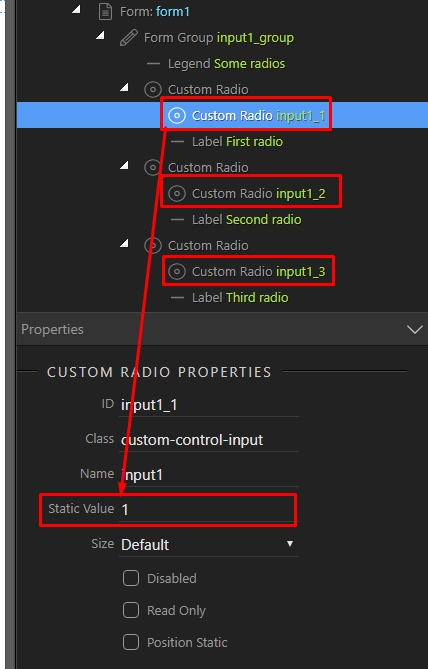
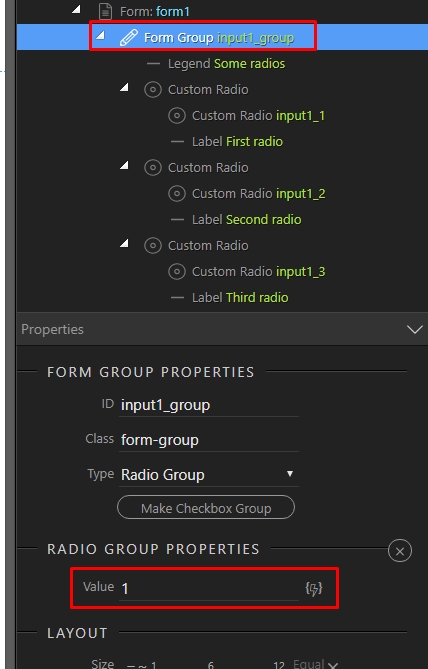
You need to make sure your radio buttons have unique IDs, otherwise they won’t work.

1 Like

Tried that, still acting weird:

Wappler - The Visual Web App Creator 2019-03-07 12-15-40.mp4 (18.1 MB)

I don’t see anything related to IDs on your video.
Better provide a link to the page as i cannot debug through a video :slight_smile:

They are all on the App connect panel :slight_smile:
But happy to upload it somewhere if it helps!

here you go:

https://www.dogpoint.hu/radiogroups.php

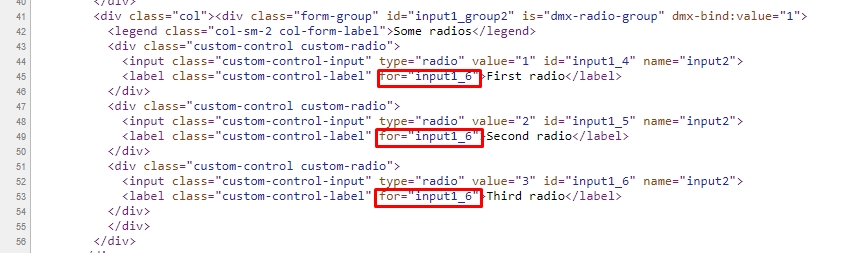
The “for” attributes are pointing to the same ID. They should also be unique:

2 Likes

Got it, thanks Teodor!