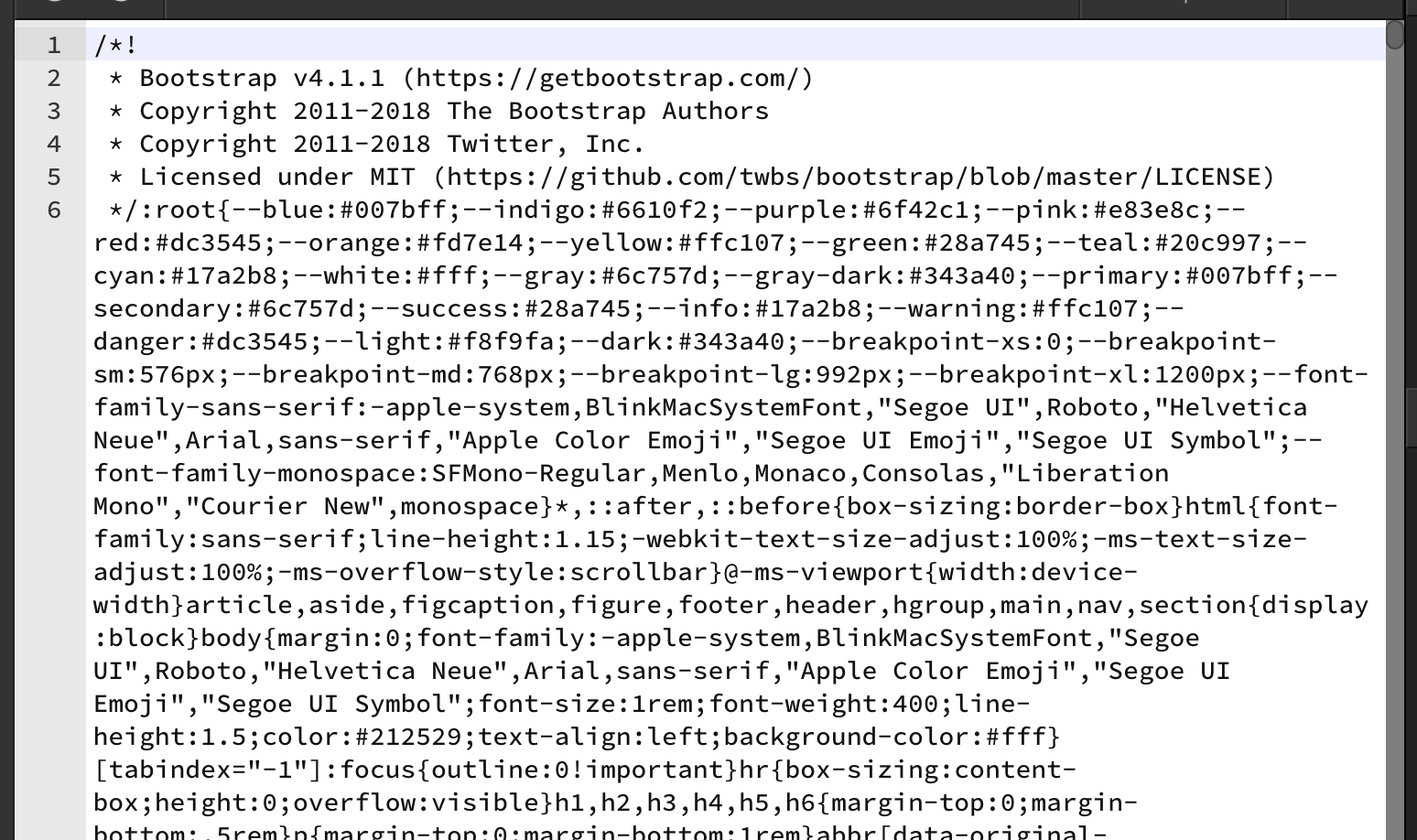
Is there any chance you could post a short video of the steps you take to reproduce this error. We can all help if you give us as much information as possible.
It sounds like what you are doing is starting a new project, creating a new page, then opening code view and placing a link in the head to your own custom framework files. Is this correct.
Bankole thank you for the video. Unfortunately you are just opening the same corrupted file in it, so we have no idea of how this can happen.
The question was to make a video that shows - starting from a whole new file and showing the steps so it gets like this.
So start completely new, with blank file and try to make it like this.
Otherwise it seems that you just have an index.html with bootstrap code in it - maybe you dragged the bootstrap file per accident and dropped it on top of the index file … then it replaces its contents - well at least in code view
From the video I see that the editor freezes after maximizing it, but it doesn’t explain how the file could be corrupted. I can only see the start of the file source code, did you check the whole code? Is is possible that the bootstrap is only pasted in the document at the top. It is possible that you for example dragged the css file from the explorer in the code editor, this would paste the content from the file at that position in the code.
Alright, does that explain the continuous loop of the wappler startup splash, or non-responsive menus and tabs in the video. FYI…i did not drag bootstrap file over my file. I am hoping to see updates, i am aware this is work in progress, a standard application will even though there was a error allow you to UNDO severally, will not be unresponsive for other related events. If i am to record a video from start to the crash, I will be recording several GBs…But thanks anyway.
I love the concept, I will keep trying till everything becomes great.
Please send us the log file and the corrupted file to investigate.
I found out that the freezing is due to the large file, it happens when you open a very large minified file, the editor has to process the file for the color formatting and that freezes the editor for a while. On my computer it did freeze for about 10 seconds, but it seems that on your system there are more things slowing down since the startup also took very long in the movie, this normaly would take a few seconds.
Yes indeed because of the large file size - our code view that is based on codemirror, takes awful long time to render so it freezes for a while. We might add a protection for this and alert the user first if he really wants such big files to be open in code view ...
‘Save’ causes changes to revert or corrupts page elements
App often freezes - need to force close and reopen
CSS ‘Styles’ not responding to changes made or updates the page very slowly
Steps to reproduce
make a change on a page
hit CMD-S, or Tab or ‘Save’ in the File/Save menu -changes revert or elements scramble
Enter ‘Styles’ panel, make a rule addition or update - change does not display on page or takes a long time to display
Is this maybe related to a specific page of yours? Maybe with some special CSS file included?
Could you be more specific about the “corrupt page elements” ?
As for the CSS Designer - it might get slow when there is huge amount of CSS files included.
Could you make a sample of your situation - the page and used css, so we can check it out?
Also a short movie illustrating the problem will be really useful
Could you try it on another page? That has different CSS includes
On a number of occasions, when I save a page I get a bootstrap error and the page’s content is replaced by bootstrap code and will not display. See the attached Screen Shot. I do not know what I do that causes this - seems to happen to me sporadically.
I’ve tried several times to build from scratch but after I’ve worked awhile in the app. adding files, copying text, modifying elements and their respective CSS rules or added inline CSS rules, Wappler becomes unreliable, corrupts my ‘Save’ attempts or even freezes.
Let me know if these files can give you a start as to what’s causing my issues. BTW, I also installed Wappler v1.0.5 on another Macbook running OSX 10.11 and experienced the same issues.
We still haven’t tracked the issue of the minified bootstrap css code getting injected into the main html page.
This can definitely cause delays and freezing as it is huge code to load in code view. So if you can find out when this happen exactly it will be of a huge help @randyrie and @Bankym
Here are two mp4’s that show one instance (other instances occur as well on other pages) of the BS4 code appearing on my page. As long as I don’t save, I can revert back to the original and retry. First vid shows what happens if I make a correction to an element in the Styles panel (I can recover if I don’t save - if I do save the page becomes corrupted and the app freezes): BS4 code with correction.mp4 (25.7 MB)
Vid 2 shows that the error does NOT happen if I do not make any corrections to the element’s CSS is the Styles panel: Fine-No Correction.mp4 (25.2 MB)
Obviously, I’m doing something Wappler doesn’t like and causes the Bootstrap error and screen freeze. I can provide other examples but these two exemplify what I’m experiencing. Hope this helps, George.
Thanks Randy for the videos, we finally have found the cause of the bootstrap css code injection. We are working on a solution and expect that we will have it fixed in this weeks update.
The freezing of the editor happens only when a file has a lot of code on a single line, like the minified bootstrap code that was inserted in some edge cases.