Contact form issies

Wappler Version : 3.83
Operating System :win 10 pro
Server Model: php
Database Type:n/a
Hosting Type: shared

Expected behavior

submit form to e-mail

Actual behavior

What actually happens?

form fails with a message that required fields are missing but they are filled in?

How to reproduce

page address
Eichelbergers

fill in the form and submit

I only changed the api settings to try a different smtp account

Your form doesn't show any errors related to fields missing.
The problem is it cannot connect to your smtp server:

Screenshot 2021-03-17 at 18.18.56

so please make sure you enter the correct details there. From what i see it times out, as the error appears like 10-15 seconds after the form is submitted.

hmm. I switched it back to the old mailer action but still had issues. I guess I’m seeing the fields required message because it stumbles on the server connection.

I’m seeing the fields required in the developer tools of the browser. I’m not great at using them. sorry

Can you please post a screenshot of what exactly are you seeing? I see the error message i posted above, and it has nothing to do with any of the form fields.

In order to show the exact error returned by the SMTP server you can:

Open the following file in your site root:

/dmxConnectLib/PHPMailer/PHPMailer/PHPMailer.php

and edit line 401 from:

public $SMTPDebug = 1;

to

public $SMTPDebug = 3;

save the file and try sending the mail once again. You will see more detailed error in the console - please paste it here.

{“code”:2,“file”:"/home2/rokit36/public_html/dmxConnectLib/PHPMailer/PHPMailer/PHPMailer.php",“line”:1879,“message”:“SMTP connect() failed. https://github.com/PHPMailer/PHPMailer/wiki/Troubleshooting",“trace”:"#0 /home2/rokit36/public_html/dmxConnectLib/PHPMailer/PHPMailer/PHPMailer.php(1601): PHPMailer\PHPMailer\PHPMailer->smtpSend(‘Date: Wed, 17 M…’, ‘Web Page Inquir…’)\n#1 /home2/rokit36/public_html/dmxConnectLib/PHPMailer/PHPMailer/PHPMailer.php(1437): PHPMailer\PHPMailer\PHPMailer->postSend()\n#2 /home2/rokit36/public_html/dmxConnectLib/modules/mail.php(133): PHPMailer\PHPMailer\PHPMailer->send()\n#3 /home2/rokit36/public_html/dmxConnectLib/lib/App.php(195): modules\mail->send(Object(stdClass), ‘’)\n#4 /home2/rokit36/public_html/dmxConnectLib/lib/App.php(159): lib\App->execSteps(Object(stdClass))\n#5 /home2/rokit36/public_html/dmxConnectLib/lib/App.php(127): lib\App->execSteps(Array)\n#6 /home2/rokit36/public_html/dmxConnectLib/lib/App.php(116): lib\App->exec(Object(stdClass), false)\n#7 /home2/rokit36/public_html/dmxConnectLib/lib/App.php(94): lib\App->exec(Object(stdClass))\n#8 /home2/rokit36/public_html/dmxConnect/api/email.php(91): lib\App->define(’{\n “meta”: {\n …’)\n#9 {main}”}

I see the error on your page:

2021-03-17 17:04:02 Connection: opening to wellcheckup.com:25, timeout=300, options=array (  &#039;ssl&#039; =&gt;   array (    &#039;verify_peer&#039; =&gt; false,    &#039;verify_peer_name&#039; =&gt; false,    &#039;allow_self_signed&#039; =&gt; true,  ),)<br>
2021-03-17 17:04:36 Connection failed. Error #2: stream_socket_client(): unable to connect to wellcheckup.com:25 (Connection timed out) [/home2/rokit36/public_html/dmxConnectLib/PHPMailer/PHPMailer/SMTP.php line 380]<br>
2021-03-17 17:04:36 SMTP ERROR: Failed to connect to server: Connection timed out (110)<br>

there is something wrong with your smtp details or smtp server it just times out… Please double check all the connection details you have entered.

Also, as we already have the detailed error please edit the file back and set the debug variable back to

public $SMTPDebug = 1;

incidentally the setting was at 0

I think it’s a connection issue. I set up another that i knew had worked here and it’s fine. It may also be related to the fact that when I set it up I gave it a name with a “-” in it. I got a warning that it wasn’t allowed but it still saved a second copy of it. I’m going to start over
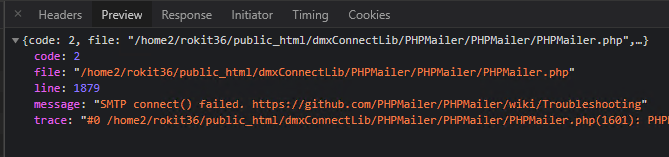
The error message pretty well explains the problem:

unable to connect to wellcheckup.com:25 (Connection timed out) 

it cannot connect to a smtp server on this address at that port. Your connection details are probably wrong.

ok thanks