Hi everybody,
I m so sorry these week I din t follow properly the forum but I had to work (sometimes happens)
I got a problem that I think I can solve in wappler but because I’m not so good in Conditions in Server Connect I m here to challenge you (translation: help me pleaseeeeee )
The problem is the following:
I have two tables in MySQL with long list of emails.
The second table contains a subset of the first email.
Like a full list of mailing list and just the list who opened the email.
I would love to make a repeat in ServerConnect to compare the list and when an email is found in the “opened” table, it is deleted in the big list…
I tried to do it… but at the last I got message from Wappler:
“Roberto, switch off and go outside walking, it is better!!”
Obviously i cant be precise as i don’t have the structure but the query would be similar
DELETE * FROM table1 WHERE table1.email in select email from [table2]
Alternatively you could create a new table using a union which will merge the two lists
something like: select email from main union select email from list
(EDIT. After re-reading this second option is probably not what you want)
Sadly neither are supported directly in Wappler but could be run through an SQL manager
I never got the answer to how often this query has to be run and if it needs to be inside a webpage but if it is a one off or an occasional task then running the following from a query manager will remove all entries from email_total which are in email_brokers
delete from email_total where et_emailaddress in (select eb_emailaddress as et_emailaddress from email_brokers)
(or i could give you a few lines of PHP to put in the page to do this, not the wappler way but it will work efficiently)
Thank you very much @s.alpaslan the first solution is exactly what I wanted to achieve…
I wish to thank you that you reply to my also in a very busy day.
One think I would like to ask you… please
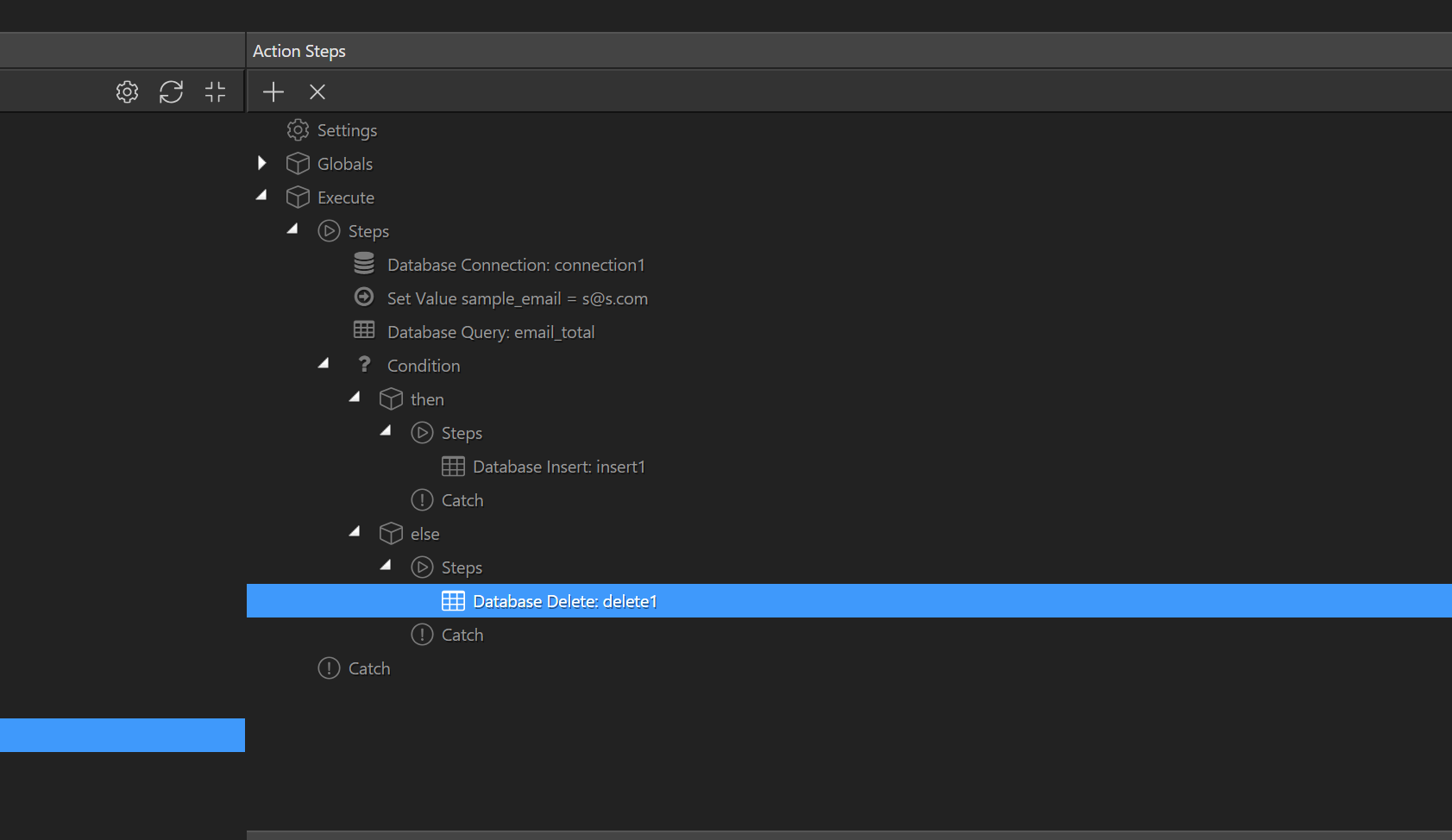
if you could explain me all the steps (when you will have time) because I do not understand the Set Value and how you did the condition.
Step 1
set value just I want to show you … you can use it any post or get variables . it will work
Step 2
We need to check mails if exists or not exits via query email_total
Step 3
This is condition step . Expression has to be like this {{email_total}} …
if expression email_total return true you can create new action like delete/update/select or insert
if expression email_total return false then you can create new action like delete/update/select or insert
 )
)