Checkbox.select() Only Seems to Do Half The Job

I want to be able to set the value of a checkbox when the text “Click Me” is clicked elsewhere in my design.

That checkbox controls the visibility of some other text “Some text”. This works okay in that when I check or uncheck the checkbox, this text appears and disappears.

The problem is…

When the text “Click Me” is clicked, the checkbox is selected but the text “Some text” does not become visible.

Here is my checkbox:

<input id="cbox" class="input_checkbox_search" type="checkbox">
<label class="label_checkbox_search" for="cbox">My Checkbox</label>

Here is the text made visible when the checkbox is selected:

<p dmx-show="cbox.checked">Some text</p>

And here is the on-click text to select the checkbox:

<p  dmx-on:click="cbox.select()">Click Me</p>

Am I doing something wrong here, or is this a bug in Wappler? :thinking:

Try the following

    <div class="container">
        <div class="row">
            <div class="col">
                <label class="label_checkbox_search" for="cbox">Click Me</label>
            </div>
        </div>
        <div class="row">
            <div class="col">
                <input id="cbox" class="input_checkbox_search" type="checkbox">
                <label class="label_checkbox_search" for="">My Checkbox</label>
                <p dmx-show="cbox.checked">Some text</p>
            </div>
        </div>
    </div>
1 Like

Thanks for this @ben

But are you saying I need to change my clickable text from a <p> to a <label>? I’m not using it in a context where it makes sense to do this…

Hey Anotony,

I don’t know the why behind it, but this will work:

<p dmx-on:click="cbox.setValue(); cbox.select()">Click Me</p>

It seems that using just select() doesn’t seem to trigger the checked action, but if you also include a setValue() step then it worked for me (doesn’t seem to need a value…but if you’re using a standard 1/0 for true/false you could set it as 1).

Hope this helps.

I am sorry that you did not try it, it is your loss.

For more: https://developer.mozilla.org/en-US/docs/Web/HTML/Element/label

2 Likes

Thanks @Philip_J! :slight_smile:

Well Ben it was 1 o’clock in the morning here in the UK when I read and replied to your email... :slight_smile: kinda bed time for me!

I'm using a checkbox form as a dynamic server connect filter like this:

<form id="CategoryFilter">
                                        <div class="form-group mb-3" id="categories" is="dmx-checkbox-group">
                                            <div class="form-check" dmx-repeat:categories="GetCategories.data.Categories">
                                                <li class="widget-filter-item d-flex justify-content-between align-items-center mb-1">
                                                    <input class="form-check-input" type="checkbox" id="input_category" name="inp_category" dmx-bind:value="CategoryID" dmx-bind:checked="query.categories.split(',').contains(CategoryID.toString())">
                                                    <label class="form-check-label widget-filter-item-text col ms-2" for="input_categories" dmx-text="TranslationCategoryName" dmx-on:click="input_category.select(!input_category.checked)"></label>
                                                    <span class="fs-xs text-muted"></span>
                                                </li>
                                            </div>
                                        </div>
                                    </form>

So I was able to check the checkbox by clicking the label, but the data is not reloaded. How can I achieve that? Which action is triggered by clicking the actual checkbox and should thus be triggered on clicking the label as well?
I tried Set value for the checkbox, Set value for the form group, submitting and resetting the form, running the server connect call again, all without success. How can I achieve the same result as when clicking on the actual checkbox instead when clicking the label?

Thanks for any help in advance!

Which data are you referring to?

Hi Teodor,

The page loads a server connect action where the checkboxes are used as dynamic filters for the database query:

It loads a list of products (filtered on category, style, etc) which is shown in a repeat grid.

Whenever the actual checkbox is clicked the server action is re-run and the new filters apply, so that's what I want to trigger as well when clicking the label.

Well first of all you don't need a dynamic event for the label to check or uncheck its checkbox.
You need a dynamic id for the checkbox, for example:

dmx-bind:id="'checkbox_'+$index"

and a dynamic for attribute for the label:

dmx-bind:for="'checkbox_'+$index"

And remove the dynamic event from the label.

I tried for hours, but just can't get this right.

Could you please check this (temporary, sorry for that) url?

This is the checkbox code for the Category filter for example:

<!-- Filter by Category -->
                    <div class="card mb-grid-gutter">
                        <div class="card-body px-4">
                            <div class="widget widget-filter">
                                <h3 class="widget-title" dmx-text="staticTranslatedPhrase.value.Category">Category</h3>
                                <ul class="widget-list widget-filter-list list-unstyled pt-1" style="max-height: 30rem;" data-simplebar="" data-simplebar-auto-hide="false">
                                    <form id="CategoryFilter">
                                        <div class="form-group mb-3" id="categories" is="dmx-checkbox-group">
                                            <div class="form-check" dmx-repeat:categories="GetCategories.data.Categories">
                                                <li class="widget-filter-item d-flex justify-content-between align-items-center mb-1">
                                                    <input class="form-check-input" type="checkbox" id="input_category" name="inp_category" dmx-bind:value="CategoryID" dmx-bind:checked="query.categories.split(',').contains(CategoryID.toString())">
                                                    <label class="form-check-label widget-filter-item-text col ms-2" for="input_categories" dmx-text="TranslationCategoryName" dmx-bind:for="CategoryID"></label>
                                                    <span class="fs-xs text-muted"></span>
                                                </li>
                                            </div>
                                        </div>
                                    </form>
                                </ul>
                            </div>
                        </div>
                    </div>

When the checkbox is clicked, the product list is filtered as intended.
I need the product list also to be updated when a category checkbox's label is clicked (and the checkbox thus checked/unchecked).

Also, when the CategoryID is in the categories query parameter list I need the checkbox to be checked and the product list to be filtered on that category list.
Currently I use this to check the checkbox dynamically, but that doesn't check it when the CategoryID is in the 'categories' query parameter:

query.categories.split(',').contains(CategoryID.toString())

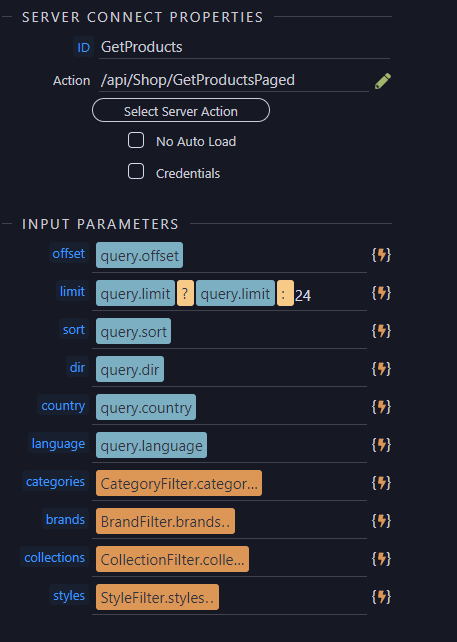
The server action call is:

<dmx-serverconnect id="GetProducts" url="/api/Shop/GetProductsPaged" dmx-param:offset="query.offset" dmx-param:limit="query.limit?query.limit:24" dmx-param:sort="query.sort" dmx-param:dir="query.dir" dmx-param:country="query.country" dmx-param:language="query.language" dmx-param:categories="CategoryFilter.categories.value" dmx-param:brands="BrandFilter.brands.value" dmx-param:collections="CollectionFilter.collections.value" dmx-param:styles="StyleFilter.styles.value"></dmx-serverconnect>

Hope you can help me to fix this. Thanks a million in advance!

On your link i don't see any dynamic dmx-bind:for for labels or dmx-bind:id for the checkboxes ...
Also, in the code you pasted above, the checkbox is missing the dynamic id dmx-bind:id

Your checkbox and label code should be:

<input class="form-check-input" type="checkbox" id="input_category" name="inp_category" dmx-bind:id="'category_'+CategoryID" dmx-bind:value="CategoryID" dmx-bind:checked="query.categories.split(',').contains(CategoryID.toString())">
<label class="form-check-label widget-filter-item-text col ms-2" for="input_categories" dmx-text="TranslationCategoryName" dmx-bind:for="'category_'+CategoryID"></label>

in order for the label to check the checkbox.

Oh I get it now, thanks! Both checkbox and label clicks are now setting the right values and applying the filter correctly.

Only this part is still not working as intended:

dmx-bind:checked="query.categories.split(',').contains(CategoryID.toString())"

When for example the url with query ?categories=4 is directly visited, the category with CategoryID 4 is not checked. How can I fix that?

I don't know why the expression for checked is not working. Please provide a link where i can check this.

I updated the url I sent previously. CategoryID = 6 is the 'Dining Chair' category, thus that category filter checkbox should be checked so only products in that category are shown. You can see the category of a product by hovering it's card. Thanks again for your help in advance!

PS: Seems to me it has something to do with loading order: For example, when a category link on a product card is clicked, it does seem to work correctly. And in that case it's an internal link and the page doesn't have to be reloaded completely, so that's why the loading order might be the problem I think. Don't know how to solve that issue however, so hope you can help me with that :slight_smile:

You are using a checkbox group component, it has a value which is used exactly for your purposes - to check the checkboxes when the values match.
Remove the checked attribute from the checkbox itself and add:

dmx-bind:value="query.categories.split(',')"

to

<div class="form-group mb-3" id="categories" is="dmx-checkbox-group">
1 Like

Fantastic Teodor, that's it!! :smiley::+1:
Thanks a lot for taking the effort to help solving this, because I would for sure not have figured this out on my own :pray:

1 Like