When creating a new project in a folder with a space (Documents/Wappler Websites), I get an error message Project path should not contain spaces!.
There used to be no error when creating new projects in a folder with spaces - not sure when this issue started.
To get around this issue, I have created a new folder with no spaces in the name. But now I have two project folders to maintain.
I tried to copy a project from one folder to another. But the project couldn't be opened in Wappler as an existing project - I kept getting errors.
Is there a way to safely copy projects from the folder with space to a folder with no space? Does GIT work correctly if project files are moved between folders?
Same here, had that happen last week. Surprised me because almost all my other projects, about 2 dozen, have spaces in the name. I didn’t see anything in the updates that stated this would change.
Thanks for the steps to open a project in another folder.
I have tried these steps, but this process doesn't work when copying the project folder from the original folder location (without spaces) to another folder location (with spaces). The app keeps crashing because Wappler recreates the project folder and files in the original location. So, there are two issues:
Wappler doesn't recognise the new project location in the folder name with spaces
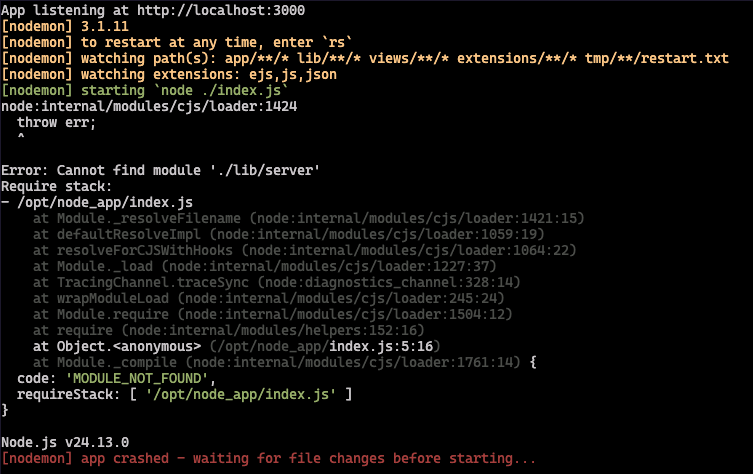
A new project folder is automatically generated in the original folder location. As most of the required core files are missing in the auto generated folder, the app crashes with the following errors:
I wasn’t able to resolve this, so I started creating new projects directly inside C:\. Only then did it start creating projects again. Inside the Documents folder, it doesn’t work.