When I click the button, the update is OK, but that record, no longer having any reason to be in the list, should automatically disappear.
Instead, I need to manually refresh the page.
I tried adding a browser reload, but then the update no longer works.
You don't need to reload the whole page, you only need to reload the server action that is used for the table data, after the update. So add a Run step in the flow, after the update step, and select the server action on the page to run it.
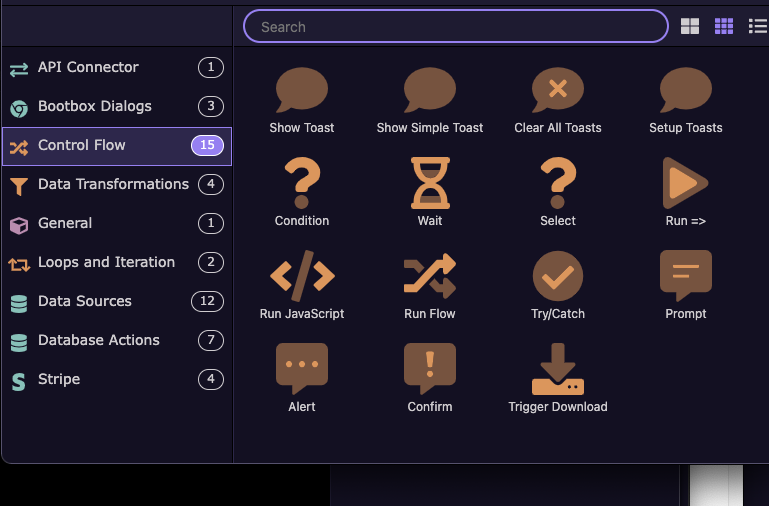
The problem is that the procedure isn't for deleting a record, but for updating a record field.
To put it simply, the page only displays records with the value CONFIRMED in the status box.
When you click the button, the record status changes to CANCEL.
And the record will appear in other tables, while it should no longer appear on the page.
This happens if I manually refresh the page; that's why I was thinking of a reload to automatically update the page.
Marzio, it does not matter if the action is delete or update. The logic is the same - you don't need to refresh the page.
You want to refresh the data source displaying the records on the page after the update action runs. So as i explained:
Add a Run step in the flow, after the update step, and select the server action displaying records on the page to run it.
OK
add Action in PageFlow RUN or RUN FLOW ?
You need to add a step called Run, then select to run the server action displaying records on the page.
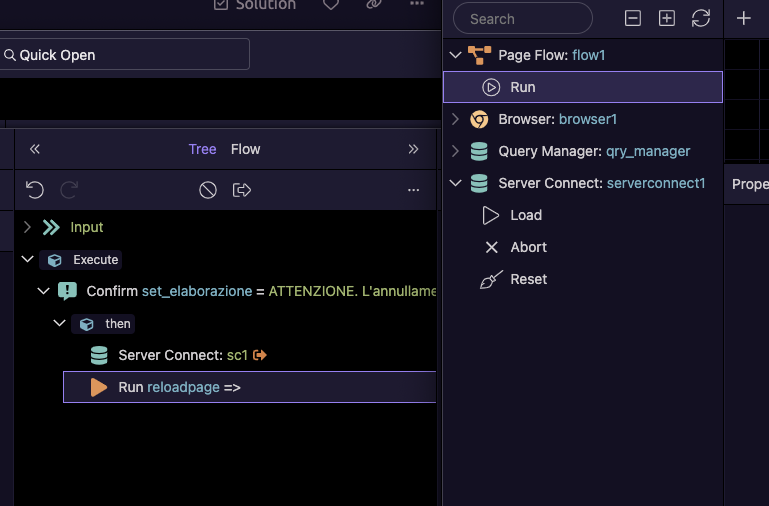
If serverconnect1 is the data source which displays the records in the table on the page, then choose the Load action for it.
Perfect, it works now.
Thanks Teodor, I was a little confused.