Possibly a silly question because I doubt you can, however always best to ask.
If I am inside a repeat or repeat children region and I would like to add a little piece of text to only one item, that i do not want iterated as many times as the count of the repeat, is there a command i could use to say, ignore the repeat on this one element?
Hi Paul,
Is it possible to explain your idea a little more detailed ?
I have a situation like this

Those 2 headings “YOUR ACCOMMODATION OPTIONS…” and “…EXPLORE” should only ever show once each.
The challenge here is that I do not know how many cards are going to be inside the area, there could be a maximum of 8 cards in total, and generally 4 would be Accommodation cards and the second 4 would be Explore/Activity cards. So we could have any of these options just to give you an idea.
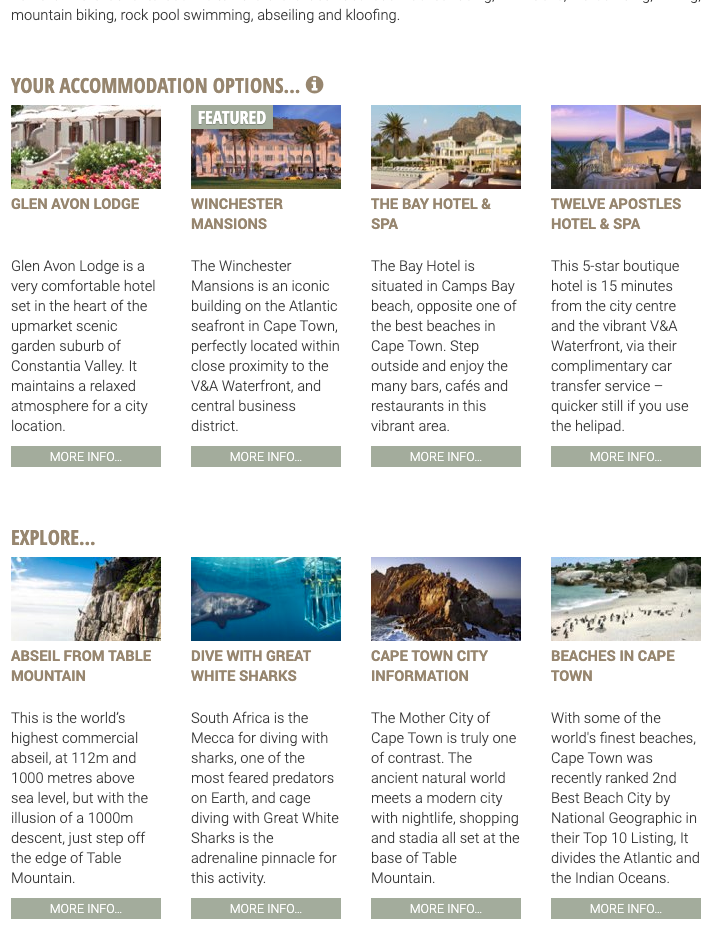
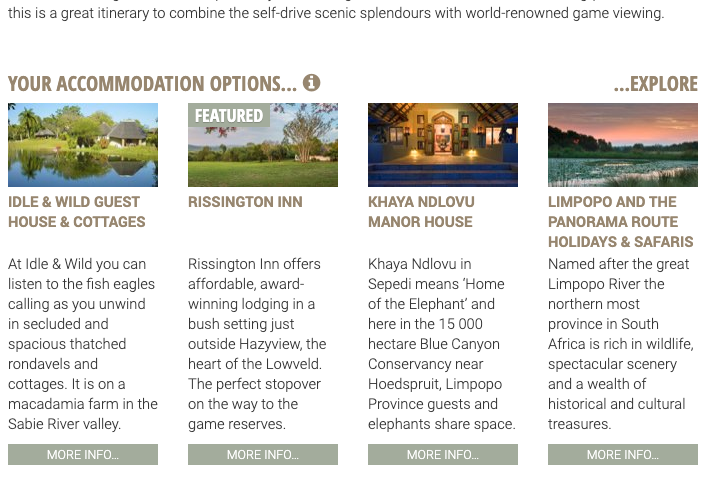
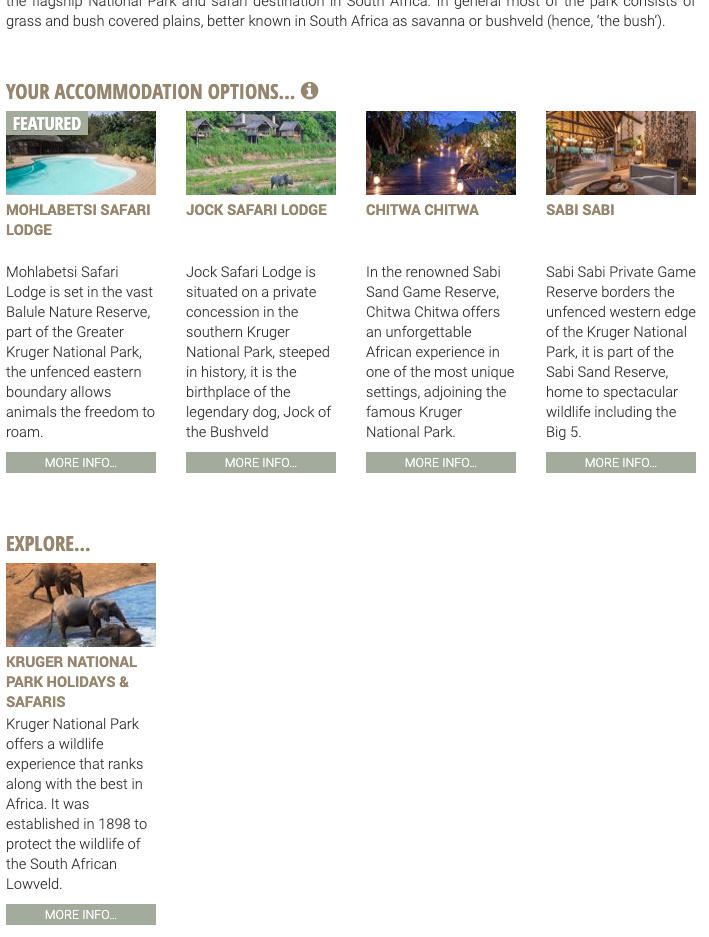
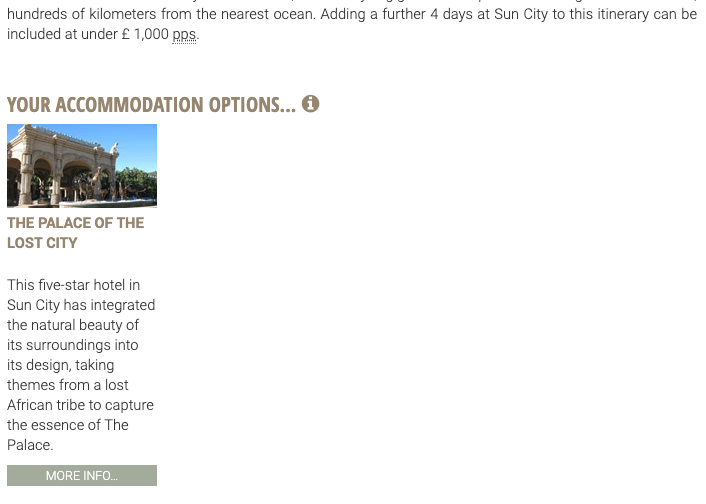
I have a card deck component, with 2 card elements inside, and each card element is a repeat to get where i am so far.
The only way i can imagine to make this work is to add a massive IF type condition
IF accommodation repeat count = 1 then show YOUR ACC…
IF activity repeat count = 1 then show EXPLORE…
IF accommodation repeat >= 4 them hide EXPLORE… from the first line because now it needs to go into the second row of cards
This is doing my head in a little, but I assume i need to put the headings into the repeats to control the counts of the repeats?
If this helps at all
<div class="container mt-4" id="ac-accomm-act-cards-in-itin-days">
	<div class="row">
		<div class="ac-colourA mb-2 ac-fontB h5 col-6 px-0">YOUR ACCOMMODATION OPTIONS...</div>
		<div class="ac-colourA mb-2 ac-fontB h5 text-right col-6 px-0">...EXPLORE</div>
		<div class="card-deck">
			<div dmx-repeat:repeat_accommodation_in_itin_days="scViewItinerariesDetail.data.repeat_records_accom_acts_in_days[$index].query_available_accom" class="card pl-0 pr-0 border-0 mb-5" data-toggle="modal"
				data-target="#page_modal_accommodation" dmx-on:click="page_modal.show();scViewAccommodationDetail.load({accom_id: accom_wrap_id})">
				<img class="card-img-top" alt="Card image cap" dmx-bind:src="accom_wrap_image_url">
				<div class="card-header bg-white ac-colourA ac-fontC7w border-0 pl-0 pr-0 ac-font-size-110" dmx-text="accom_wrap_name"></div>
				<div class="card-body pl-0 pr-0 pt-0">
					<p class="card-text ac-colourB ac-fontC3w" dmx-text="accom_wrap_preview_text"></p>
				</div>
				<div class="card-footer btn ac-bg-colourA btn-block ac-fontC ac-fontC3w p-0 border-0 ac-font-size-95">
					<a class="text-white stretched-link">MORE INFO...</a>
				</div>
			</div>

			<div dmx-repeat:repeat_activities_in_itin_days="scViewItinerariesDetail.data.repeat_records_accom_acts_in_days[$index].query_available_act" class="card pl-0 pr-0 border-0 mb-5" data-toggle="modal"
				data-target="#page_modal_activities" dmx-on:click="page_modal.show();scViewActivitiesDetail.load({act_id: act_wrap_id})">
				<img class="card-img-top" alt="Card image cap" dmx-bind:src="act_wrap_image_url">
				<div class="card-header bg-white ac-colourA ac-fontC7w border-0 pl-0 pr-0 ac-font-size-110" dmx-text="act_wrap_name"></div>
				<div class="card-body pl-0 pr-0 pt-0">
					<p class="card-text ac-colourB ac-fontC3w" dmx-text="act_wrap_preview_text"></p>
				</div>
				<div class="card-footer btn ac-bg-colourA btn-block ac-fontC ac-fontC3w p-0 border-0 ac-font-size-95">
					<a class="text-white stretched-link">MORE INFO...</a>
				</div>
			</div>
		</div>
	</div>
</div>
I see you have 2 repeats in the row? Does that matter?
Or do you just want to show title1 before the 1st result if the records are <= 4 and then title 2 before the 5th result, if the records are > 4 ?
Or should title 1 appear above repeat 1 and title 2 above repeat 2?
The Accommodation title needs to only show when there are accommodation options in the repeat, so more than 1 but its position is pretty static as the first thing on the first card, so hat one should be fairly simple.
The Explore one is a pain, it needs to only show if there are more than 1 items in the second repeat, and if the first card in the repeat is in the top row then it must show as …EXPLORE to the right of row 1, so the dots are before the word. However if the first item in repeat 2 lands in position 5 or greater then the position must be in the second row and the wording changes to EXPLORE… with the dots after the word.
1 Like
I checked your layout but won’t be possible with the current implementation/layout.
I just realised what I was doing wrong Teo, managed to get it working now
<div class="container mt-4" id="ac-accomm-act-cards-in-itin-days">
	<div class="row">
		<div class="ac-colourA mb-2 ac-fontB h5 col-6 px-0" dmx-show="scViewItinerariesDetail.data.repeat_records_accom_acts_in_days[$index].query_available_accom.count() > 0">YOUR ACCOMMODATION OPTIONS...</div>

		<div class="ac-colourA mb-2 ac-fontB h5 text-right col-6 px-0"
			dmx-show="scViewItinerariesDetail.data.repeat_records_accom_acts_in_days[$index].query_available_accom.count() < 4 && scViewItinerariesDetail.data.repeat_records_accom_acts_in_days[$index].query_available_act.count() >= 1">
			...EXPLORE</div>

		<div class="card-deck">
			<div dmx-repeat:repeat_accommodation_in_itin_days="scViewItinerariesDetail.data.repeat_records_accom_acts_in_days[$index].query_available_accom" class="card pl-0 pr-0 border-0 mb-5" data-toggle="modal"
				data-target="#page_modal_accommodation" dmx-on:click="page_modal.show();scViewAccommodationDetail.load({accom_id: accom_wrap_id})">
				<img class="card-img-top" alt="Card image cap" dmx-bind:src="accom_wrap_image_url">
				<div class="card-header bg-white ac-colourA ac-fontC7w border-0 pl-0 pr-0 ac-font-size-110" dmx-text="accom_wrap_name"></div>
				<div class="card-body pl-0 pr-0 pt-0">
					<p class="card-text ac-colourB ac-fontC3w" dmx-text="accom_wrap_preview_text"></p>
				</div>
				<div class="card-footer btn ac-bg-colourA btn-block ac-fontC ac-fontC3w p-0 border-0 ac-font-size-95">
					<a class="text-white stretched-link">MORE INFO...</a>
				</div>
			</div>

			<div class="ac-colourA mb-2 ac-fontB h5 text-left col-12 px-0" style="padding-left:15px !important;"
				dmx-show="scViewItinerariesDetail.data.repeat_records_accom_acts_in_days[$index].query_available_accom.count() >= 4 && scViewItinerariesDetail.data.repeat_records_accom_acts_in_days[$index].query_available_act.count() > 0">
				EXPLORE...</div>

			<div dmx-repeat:repeat_activities_in_itin_days="scViewItinerariesDetail.data.repeat_records_accom_acts_in_days[$index].query_available_act" class="card pl-0 pr-0 border-0 mb-5" data-toggle="modal"
				data-target="#page_modal_activities" dmx-on:click="page_modal.show();scViewActivitiesDetail.load({act_id: act_wrap_id})">
				<img class="card-img-top" alt="Card image cap" dmx-bind:src="act_wrap_image_url">
				<div class="card-header bg-white ac-colourA ac-fontC7w border-0 pl-0 pr-0 ac-font-size-110" dmx-text="act_wrap_name"></div>
				<div class="card-body pl-0 pr-0 pt-0">
					<p class="card-text ac-colourB ac-fontC3w" dmx-text="act_wrap_preview_text"></p>
				</div>
				<div class="card-footer btn ac-bg-colourA btn-block ac-fontC ac-fontC3w p-0 border-0 ac-font-size-95">
					<a class="text-white stretched-link">MORE INFO...</a>
				</div>
			</div>
		</div>
	</div>
</div>
The thing i was not doing correct was that in the show statements I was not adding the [$index] in place of the [0] the data bindings picker was creating.
I think because you were unaware fully of my server connect actions it made it a little more tricky for you to figure out.
1 Like