I have an autocomplete that queries to a large dataset, however I need the user to search through this entire dataset while typing in the input field and then the autocomplete results should refresh with the queried text input.
When a user has an autocomplete field, the user should be able to choose any data from that autocomplete list. However as we have learned, the autocomplete list can only show data that is already loaded from a data source, when the user types text inside of the autocomplete, the field only shows that data. This becomes a problem when you have a large table and need to select an option further down the table.
I’ve tried to use a value changed dynamic event however that reloads the data source with the filtered text but also deletes the autocomplete values upon loading the data, this puts the autocomplete field in a loop where searched text is deleted and nothing can be selected.
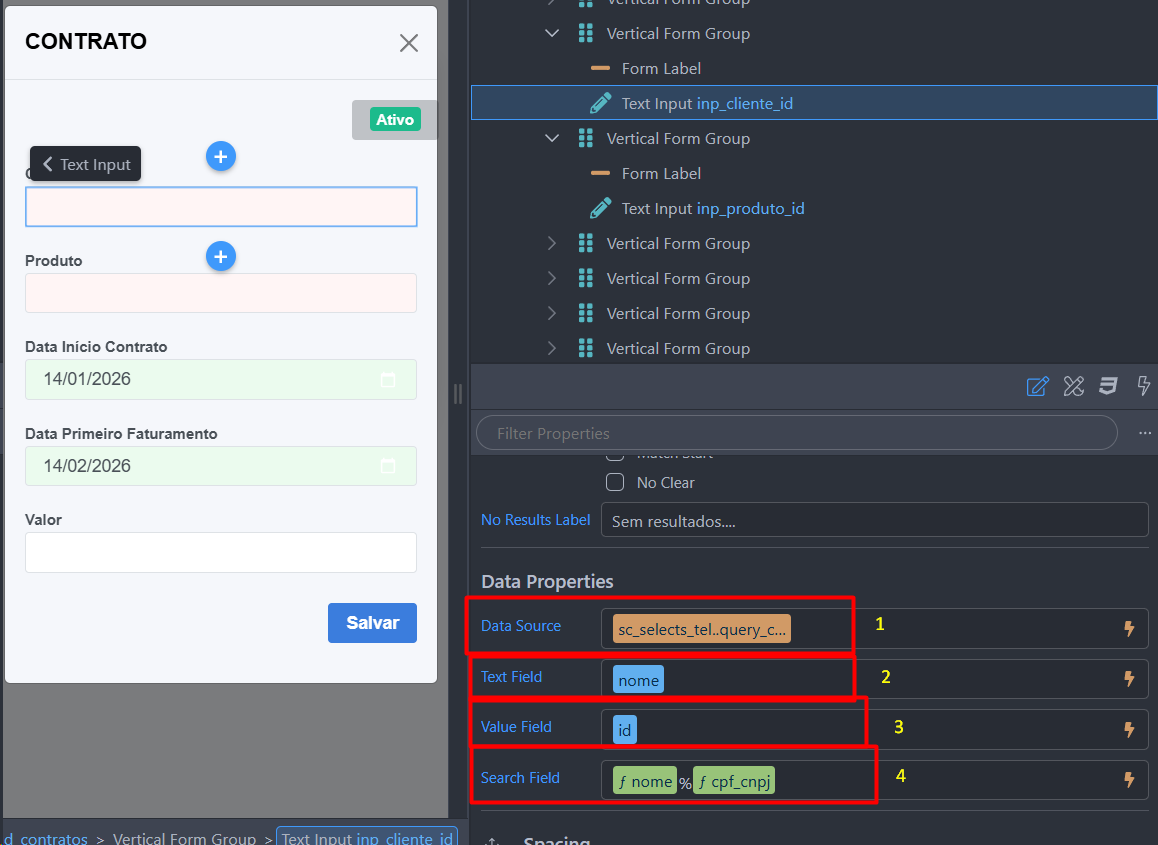
Below is a screenshot of what I’m trying to accomplish.
@Thiago_Toneli - I think this can work, however I noticed that you used a function in the Search Field. Can you share some more about how to rerun the server connect data query by the Search Field functions?
It is my understanding that the Search Field can only query data that is already loaded, but I can be mistaken.
I load the client select into a server connect on the page; the search field will filter what's already in the data source loaded into the autocomplete feature.
That is understandable, however the issue still exists.
What I’m trying to accomplish is the autocomplete queries the database while the user is typing. What if the database has 80,000 rows, how does the user use the autocomplete. It is not ideal for Wappler to load all of the rows at once.
You could limit things in the API action by conditionally checking the input length and only returning results when, say, 3 characters have been typed hence ensuring the entire record set is never returned
That is the goal. However when the user types text into the autocomplete field, the text is then taken and queried to a serverconnect action. When the serverconnect is finished it loads the data to the autocomplete field. When the field receives the new data it clears the field, hence this creates a loop where the user has to requery and it clears once again.
Has anyone been able to find a fix for this or made this work in another way?