Wappler Version : 6.8.0
Operating System : MacOS
Server Model: Node
Database Type: MySQL
Hosting Type: localhost
Expected behavior
What do you think should happen?
The App Connect S3 "dmx-s3-upload-multi" component creates a files array with .name as a property. The .name property should be passed to the server connect S3 signed upload component for each file. This is crucial when routines for creating unique file names are necessary since Wappler doesn't offer this in the App Connect S3 component natively.
Actual behavior
What actually happens?
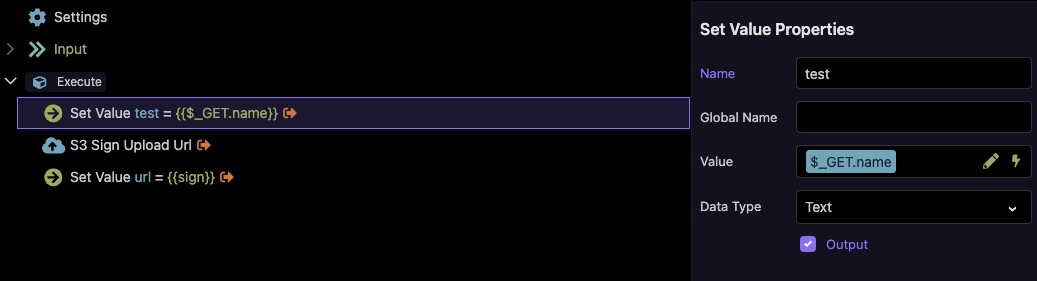
The .name property of the App Connect S3 files array is not being used to pass file names over $_GET.name to the server connect S3 signed upload component. This can be observed by intercepting the .upload(), changing the file names in the files object, and using Set Values in the server connect to see the value of $_GET.name.
How to reproduce
Insert dmx-s3-upload-multi on a content page. Create a server connect S3 sign upload API endpoint. Create a javascript routine (provided below) to handle the app connect S3 submission: rename each file name in the files object, and submit the app connect S3 component.
Use Set Value statements on the server connect to see the file names being passed in over $_GET.name.
<script>
	/**
     * The main function to handle the CDN upload process.
     * It renames the files in the Wappler component for uniqueness
     * and then triggers the component's internal upload process.
     */
    function startSecureUploadFlow() {
        // Get a direct reference to the Wappler S3 multi-upload component
		const uploader = dmx.parse("content.s3upload1");

        if (!uploader) {
            console.error("s3uploader doesn't exist.");
            return;
        }

		if (!uploader.files ) {
            console.error("s3uploader has no files.");
            return;
        }

		if (uploader.files.length === 0) {
            console.error("s3uploader file length is zero.");
            return;
        }

        console.log("Starting secure upload flow: Renaming files...");

        // Loop through the files array on the component and rename each one.
        uploader.files.forEach(file => {
            const originalName = file.name;
            const newUniqueName = createUniqueFilename(file);
            file.name = newUniqueName;
            console.log(`Original: "${originalName}" -> New: "${newUniqueName}"`);
        });

        // Now that all files have been renamed in the component's data,
        // we trigger the component's own upload method.
        console.log("All files renamed. Triggering Wappler uploader...");
		dmx.parse("content.s3upload1.upload()");
        //uploader.upload();
    }

    /**
     * Helper function to create a unique and URL-safe filename.
     */
    function createUniqueFilename(file) {
        if (!file) return null;
        const fileName = file.name;
        const fileExtension = fileName.split('.').pop().toLowerCase();
        const nameWithoutExtension = fileName.substring(0, fileName.lastIndexOf('.'));
        const uniqueId = crypto.randomUUID();
        const sanitizedName = nameWithoutExtension
            .toLowerCase()
            .replace(/\s+/g, '-')
            .replace(/[^a-z0-9-]/g, '');
        return `${uniqueId}-${sanitizedName.substring(0, 50)}.${fileExtension}`;
    }
</script>
Because App Connect S3 doesn't have any way to ensure unique file names are being copied to the object store and it doesn't have any way to receive the new file name from the object store if the bucket can provide unique file names. I prefer JS over a dmx repeat for portability reasons, and I use the s3upload1.upload() function just like Wappler would.
The issue is not being able to "see" GET.name. The issue is that App Connect is not using the file names in the s3upload1.files[ ].name into the server connect over $_GET.name. This is the issue. It's a black box where we're not able to control the name being sent over $_GET.name. We cannot change the file name in the server connect because then the signed URL doesn't match what App Connect is using for the file name. Make sense?
The 30,000 view here Teodor is that the App Connect S3 upload component doesn't offer any file utilities (like UUID file names), therefore the developer is responsible (or the app may overwrite files remotely). The S3 component doesn't use the s3upload1.files[ ].name property to upload from the client so what's the point of that?
How can a developer interact with the S3 upload to create UUID file names and have those file names honored by the client-side upload once it has a signed URL?
I'm not entirely sure I understand all the different things you mentioned in your answer. Let's go through the questions one by one.
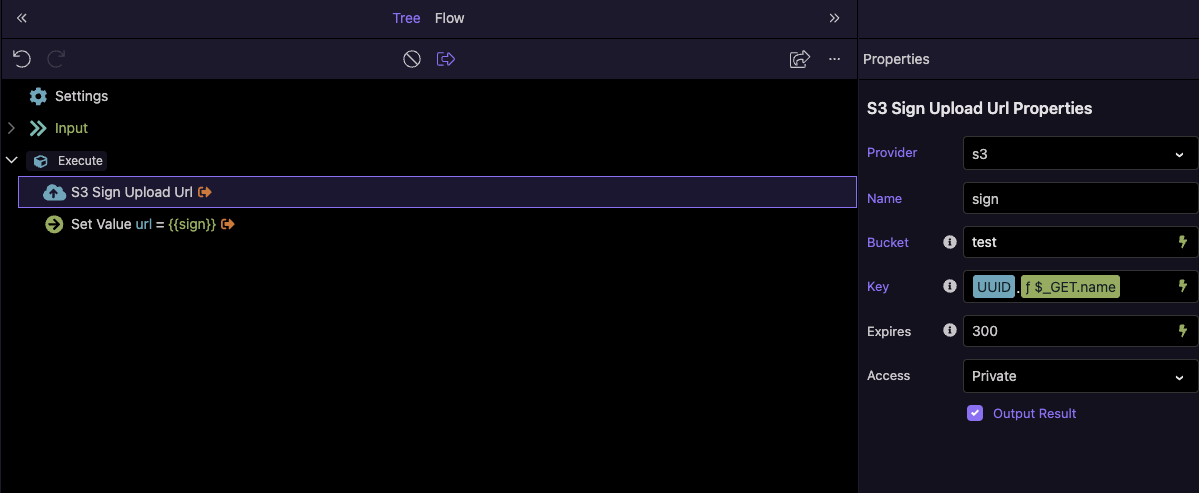
You can rename the file in the sign upload step:
I appreciate the patience. Yes, doing it your way does allow me to rename the file and successfully upload it with a signed URL. I can also revert back to using the upload() function in my button. This is a much easier process than trying to modify the files array. Thank you.
How would I pass in additional URL params to the server connect S3 sign upload from the App Connect S3 component? I need to make the Key more dynamic than just using $_ENV and UUID.
sign is not used directly on the client side, the url returns the signed URL from the backend, and the S3 component expects it to be called exactly like this url. The backend doesn't handle the file upload itself - it just generates and returns a pre-signed S3 URL. The App Connect S3 Upload component then uploads the file directly to S3 using that pre-signed URL
I get what you mean, but It's not currently possible to pass additional params to the back end with the files. Maybe we can just add an option for this @patrick, shouldn't be that hard to allow it?
@patrick It also seems that the App Connect S3 component does not see values of variables being set in server connect where the "output" checkbox is checked. I can see the name of the server connect variable in App Connect (using a browser notification), but the server connect's variable value is always blank, even when hardcoded. I can't see the value of the variable in any of the dynamic events: start, done, and success.
The goal is to receive the signed URL to store the file's final object store URL in a DB (after removing the ? and all query params). This final URL may be dynamically created in the Key in the server connect S3 component and not just the file name given in the client's file browser.
I will see what is possible with the additional params. We can probably just add them with extra attributes like with the serverconect component.
For the serverconnect data I checked the component, it seems that the standard S3 upload does set its data with the response from the serverconnect but the multi upload doesn't. I think it should probably just set its data as an array for all the individual uploads. Will see if I can fix that.
Seems that the data was available on the files collection, you can access it like s3upload1.files[0].data. With the update I also fill the s3upload1.data with the results from the serverconnect, the data is an array same as the files collection but only containing the data.
I also added a params attribute which you can use to add additional parameters for the serverconnect url. Use it as dmx-bind:params="{'extraParam': $myValue}".
@patrick Quick Update:
dmx-bind:params is working great!
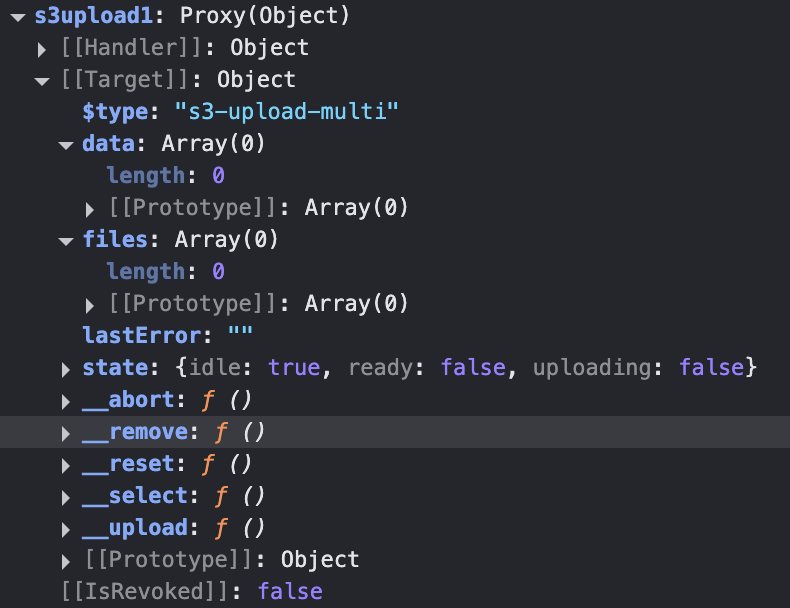
I'm having trouble accessing the s3upload1.files and .data array data. Below is a screenshot from my developer console after the s3-multi-upload component succeeds.
I only need to get the file's url path where it was saved to object storage (for retrieval later). None of the other signed URL parameter stuff is needed. For example, my 'url' variable from serverconnect, without any of the additional signed URL parameters:
@patrick I'm stuck, unable to access any variable values in the s3upload1.data array. I can see the variable names, but values are always empty, no matter which event I attach a notification/alert to.
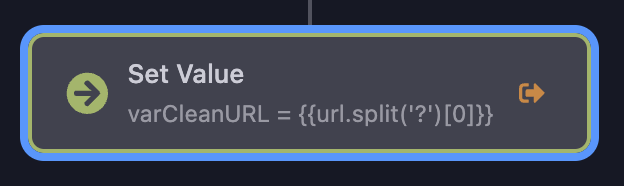
I'd like to be able to pass variables from the serverconnect back to app connect but it seems anything that comes through the S3 component client-side is blank. I have the following in my serverconnect. I can see the variable name varCleanURL in s3upload1.data, but its value is always undefined
The data should be available after the upload finished, best to wait for the success event.
If you inspect you network traffic, check the response from the serverconnect call, does it show the data correctly in the json response? I think the varCleanURL step in the server action if probably incorrect. Getting an undefined from the split formatter suggests that url was null or undefined.
Found the issue, the default behavior is that files are automatically removed after they have been uploaded. Removing the file will also remove the data for that file.
I've updated the component to not automatically remove files (you can enable this behavior again with autoremove attribute). I also have added more state to the files, on the file object you now have an extra done property to indicate that it completed that file.