Hello,
I need to use a non-string value in the JSON Data field of the API Action Properties, but I get the following error message:
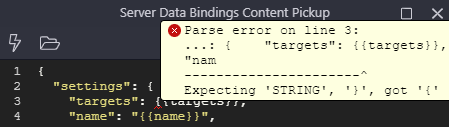
How can I resolve this?
Thank you.
Hello,
I need to use a non-string value in the JSON Data field of the API Action Properties, but I get the following error message:
How can I resolve this?
Thank you.
Wrap it in “quotes”. It will work
No, if I do that it becomes a string…
I need the values without the quotes.
Have you tried it?
Yes, of course!
Check the other bindings in the screenshot and you can see that I am using quotes.
Ok!
You can build a JSON string using a set value action sequence.
Enjoy!
I tried without success.
PHP or NodeJS?
If it’s NodeJS you can use the Group step in combination with Set Value steps inside
Edit: I’m not totally sure if my reply will help you, never tried to do what you want to do
PHP
I tried using the Set Value action to add JSON in text format and then using it in the JSON Data field of the API Action without success.
The group action is now available for all server models as of 5.5.1.
Yes, but it does not work in my case.
Why would the group action not build the exact JSON you need ?
Share you server action screenshot for review
It works within Wappler but does not work in reality because when the API Action sends the HTTP Request, the body content is text, not JSON.
Here is an update on this problem.
If I use the Set Value, the API Action sends the body content of the HTTP Request as valid JSON, but it is stringified, and the API endpoint does not interpret that correctly.
I need a “standard” JSON structure, not stringified.
How can I do that?
There is a parseJSON formatter in server connect even though it isn’t in the UI.
Try appending .parseJSON() to the value.
I tried
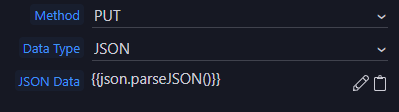
But the HTTP Requests are empty.
Sorry, just seeing this is php. I don’t know if that exists for php.
Not if the API won’t accept a string for that value