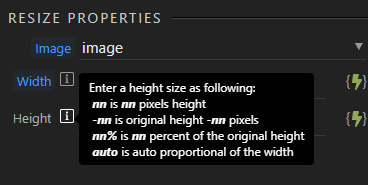
Could someone please explain the syntax (if any is possible) for the width and height properties so that resizing to a 120px side (of a square photo) happens if the width or height is no less than 120px?
In other words: no Width resizing if W is less than 120 and no Height resizing if H is less than 120.
Thank you
Do a conditional step after the load image. When image width is bigger than the height, then resize the width else resize the height. It will keep aspect ratio and it will not resize (upscale) if it was smaller.
Very nice of you, thanks!
Now I see that the Load API action returns the width and height, I was looking for that in the upload action… Indeed so simple that way.