Another leaflet maps question (sorry)

I have been playing around with leaflet, this time with marker colors.
Done lots of google checks and AI which suggests any standard html color names should work

So i tried the following colors:
beige, black, blue, darkblue, cadetblue, darkgreen, gray, darkpurple, darkred, green, lightblue, lightgray, lightgreen, lightred, orange, pink, red, aqua, teal, fuchsia, lime, maroon, olive, silver, navy, yellow & purple
as marker colors.

Only red, blue, green, pink and orange actually seem to work, remaining seem to be ignored.

Anyone any ideas why?

We had to install a plugin to allow for color variations outside of the supported colors (this is a constraint of the Leaflet marker icons themselves as far as we could ascertain).
The colors currently supported are:

'blue', 'pink', 'darkblue', 'lila', 'magenta', 'red', 'orange', 'brown', 'green', 'mint'

The colors are created using CSS hue-rotate filters applied to the default blue Leaflet marker. This is what we have defined:

.leaflet-marker-icon-pink {
  filter: hue-rotate(120deg);
}
.leaflet-marker-icon-darkblue {
  filter: hue-rotate(30deg);
}
.leaflet-marker-icon-lila {
  filter: hue-rotate(50deg);
}
.leaflet-marker-icon-magenta {
  filter: hue-rotate(90deg);
}
.leaflet-marker-icon-red {
  filter: hue-rotate(140deg);
}
.leaflet-marker-icon-orange {
  filter: hue-rotate(160deg);
}
.leaflet-marker-icon-brown {
  filter: hue-rotate(190deg);
}
.leaflet-marker-icon-green {
  filter: hue-rotate(260deg);
}
.leaflet-marker-icon-mint {
  filter: hue-rotate(320deg);
}

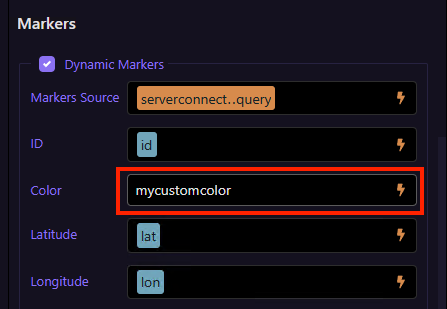
So you can actually create your own classes like:

.leaflet-marker-icon-mycustomcolor {
  filter: hue-rotate(347deg);
}

or combine it with any other filter CSS property.
then use this like:

3 Likes

Thanks Teodor, needed up to about 10 colors so they will do niceley