I have found the access details for the droplet. There is a 'reset root password' option should I click that or does complicate the even more ?
Hi Cheese,
The tutorial creates the droplet, and during that process creates a key in putty and copies it to DO. However my droplet was already created I cretaed the key in putty then saved to do when the droplet was already created.
Does the order of creating the key matter?
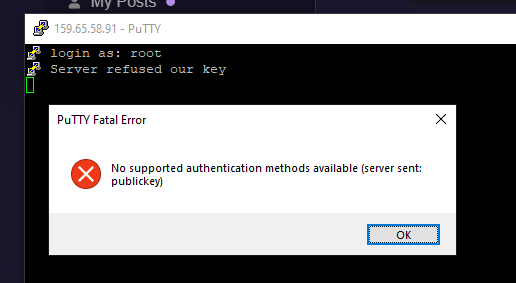
Got this
Don't panic too much, slowly slowly we'll get there! This may be easier to follow:
Sorry for not ready this entire thread, but I want to insert that when I setup droplets using the resource manager, the first thing I do is connect to them using the server terminal window provided in Wappler. This one-time step performs the process of adding the server to the known hosts of your local computer.
Just right mouse on the server inside the Resource manager and select open ssh terminal. If you see a message about known hosts, that was probably getting in your way. If not, then I've wasted your time. 
Sorry again for not explicitly catching up on the thread... pre-
1 Like
Hey thanks mebeingken yep did that already..
1 Like
Yes confirmed all should be fine. You can just deploy to this target.
The errors you see are probably from some old "test connection" and are not relevant. It will be good to know when you get them so we can fix them but as I said they don't matter.
Sorry Cheese just to clarify, do i create the key during the creation of the droplet or can i add it later once the droplet is created.
If i need to to create the key during the creation of the droplet, I will delete my existing droplet and start again
Please follow the Wappler guide, and use the Wappler build-in SSH Terminal from the context menu in Resource Manager. Then you should be able to connect to your server.
@Cheese is creating a bit of too much confusion here although well meant to help 
1 Like
But George I still can't deploy to this target, so all is not fine.
Can we just confirm that:
There is no problem with W2targets.js as this was triggered by an older connection?
As I still can't deploy to the target that I have shown you, which you said looks ok, but I have to ignore the error messages what on earth am i going to do to sort this problem???
I forget sometimes its all second nature to those of us that do this regularly and just how complex it can appear if you have never undertaken such tasks. I do apologise @JBM
Still I do admire your perseverance! One thing that will come from this issue is a far greater understanding of how things work which will benefit you in the future. Today it may not feel that way but in the long run it will become familiar and you'll waltz on through it.
George I have posted on this before where I stated I have followed the guides and tutorials to the letter and used the ssh terminal for 2 weeks now. This is just going round in circles. 
You repeatedly say it should work but it doesn't what do I now????
Cheese, don't apologise as you have been giving me clear consistent help, I know other members of the forum are very busy so posts get messy. I will continue with your line of support because there is no viable alternative...thanks for your patience
1 Like
 Wappler version update just been posted...let me install that and see if things work again .
1 Like
Have you viewed this youtube playlist.
https://youtube.com/playlist?list=PLUjqTJN3byC_KhuPg-vSqD6fgAzC0dBJz&si=DUJlCwwyBbnbph_u
Thanks hyperbytes!
In the end had to destroy my original DO and recreate a new one still can't get remote server tho
Sometimes so much quicker and easier than trying to fix one which is broken
6 posts were split to a new topic: Test docker connection not working
5 posts were split to a new topic: Error on docker deploy workers
Fixed in Wappler 6.7.0