I haven't paid attention to the collapses...
You are right:
The problem was that you have nested repeats and by using just $index is not enough because in the nested repeat the value of $index is reset.
Here is the code i modified a little and added an extra variable inside the accordion Card and before the nested repeat:
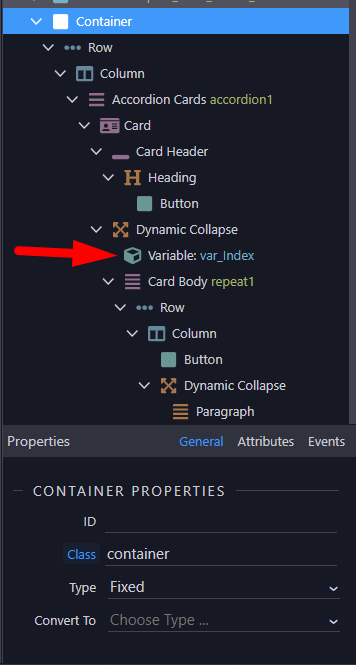
In this variable we save the current accordion item's $index.
So, now on each nested repeat we assign a dynamic attribute (id, data-bs-toggle, data-bs-target etc) by using the variable and the repeat's $index and this make sure that all items are unique.
For example: button dmx-bind:id="'btn'+var_Index.value+$index"
Here is the code:
<div class="container">
        <div class="row">
            <div class="col">
                <div class="accordion" id="accordion1" is="dmx-repeat" dmx-bind:repeat="3">
                    <div class="card">
                        <div class="card-header p-0" dmx-bind:id="'accordion1_heading'+$index">
                            <h5 class="mb-0">
                                <button dmx-bind:id="'accordion1_collapse'+$index+'_Btn'" class="btn link-primary w-100" type="button" data-bs-toggle="collapse" dmx-bind:data-bs-target="#accordion1_collapse{{$index}}" aria-expanded="true" dmx-bind:aria-controls="collapse{{$index}}">
                                    Link_{{$index}}
                                </button>
                            </h5>
                        </div>
                        <div dmx-bind:id="'accordion1_collapse'+$index" class="collapse" is="dmx-bs5-collapse" dmx-bind:aria-labelledby="accordion1_heading{{$index}}" data-bs-parent="#accordion1">
                            <dmx-value id="var_Index" dmx-bind:value="$index"></dmx-value>
                            <div class="card-body" is="dmx-repeat" id="repeat1" dmx-bind:repeat="3">
                                <div class="row">
                                    <div class="col">
                                        <button dmx-bind:id="'btn'+var_Index.value+$index" class="btn" data-bs-toggle="collapse" dmx-bind:data-bs-target="#collapse{{var_Index.value}}{{$index}}">Level{{var_Index.value}}{{$index}}</button>
                                        <div class="collapse" dmx-bind:id="'collapse'+var_Index.value+$index" is="dmx-bs5-collapse">
                                            <p class="text-center">paragraph_{{var_Index.value}}{{$index}}<br>Collapse body text goes here.</p>
                                        </div>
                                    </div>
                                </div>
                            </div>
                        </div>
                    </div>
                </div>
            </div>
        </div>
    </div>
If you have any question drop it here
Cheers 