Could you not use the below to grab the document URL?
Could do the same in PHP (as a Module):
<?php echo 'http://' . $_SERVER['HTTP_HOST'] . $_SERVER['REQUEST_URI']; ?>
Or am I off in the wrong direction again? Been a long week!
Could you not use the below to grab the document URL?
Could do the same in PHP (as a Module):
<?php echo 'http://' . $_SERVER['HTTP_HOST'] . $_SERVER['REQUEST_URI']; ?>
Or am I off in the wrong direction again? Been a long week!
Hi Dave, thanks for chiming in. There are ways of getting around to doing this as you have shown. The problem is that @George goes off pop at me when I do not follow the Wappler method. 
Could make him proud and create a Module.

Actually this is unexpected Ben. You are right.
Edit: Not that you are right is unexpected LOL. Just the behaviour.
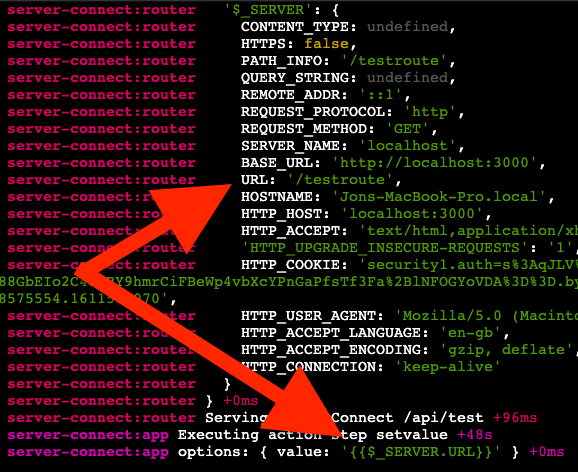
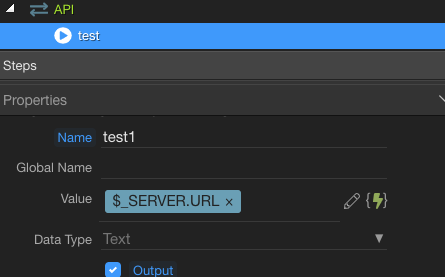
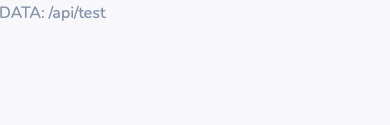
Server shows the right value, but in the frontend it shows the url of the API and not the referrer.
{
      "path": "/testroute",
      "page": "/testpage"
    },
  <dmx-serverconnect id="serverconnect1" url="api/test" site="mpc-node"></dmx-serverconnect>
  DATA: {{serverconnect1.data.test1}}
  <script src="/bootstrap/4/js/popper.min.js"></script>
  <script src="/bootstrap/4/js/bootstrap.min.js"></script>
</body>
But
Wow. Thank you for checking out! Should I file this as a bug?
This is urgent! 
While
<body is="dmx-app" id="test">
  <dmx-serverconnect id="serverconnect1" url="api/test" site="mpc-node"></dmx-serverconnect>
  <p>AC DATA: {{serverconnect1.data.test1}}</p>
  <p>SC DATA: <%=_('$_SERVER.URL',locals)%></p>
  <script src="/bootstrap/4/js/popper.min.js"></script>
  <script src="/bootstrap/4/js/bootstrap.min.js"></script>
</body>
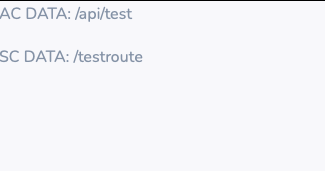
Will render:
@ben I don’t know if this is a bug or intended. Right now for me it’s just unexpected.
It would seem that the server has the right value so you should be able to filter correctly using $_SERVER.URL in SC.
If you don’t have the expected results in the server maybe it’s because another issue or the logic you are implementing in your real scenario.
Thank you, thank you. Not sure what I did wrong in the first place, but things have fallen in place. All is well.
The $_SERVER.URL is the URL from the request that is called. When you output it with a server-side in an ejs template then you get the url from the page that was requested. When you return the same $_SERVER.URL in a server action it will return the url of that server action, since that is the request that was made. This is the expected behavior and works the same in NodeJS, ASP and PHP.
If you want the url client-side of the current page use the browser component {{browser1.location.pathname}}.
Thanks for clarifying Patrick!
Thanks for the clarification @patrick. Would you enlighten me practical usage case of those server variables. In my test, only HTTP_USER_AGENT returns the information from the client side so I can use it for logging.
@JonL thank you! Was trying various ways to get the page dynamically to add to the base url I have stored in the database and this <%=_(’$_SERVER.URL’,locals)%> is what I needed. 
<link rel="canonical" href="<%=_('canonical')%><%=_('$_SERVER.URL',locals)%>">
-Twitch