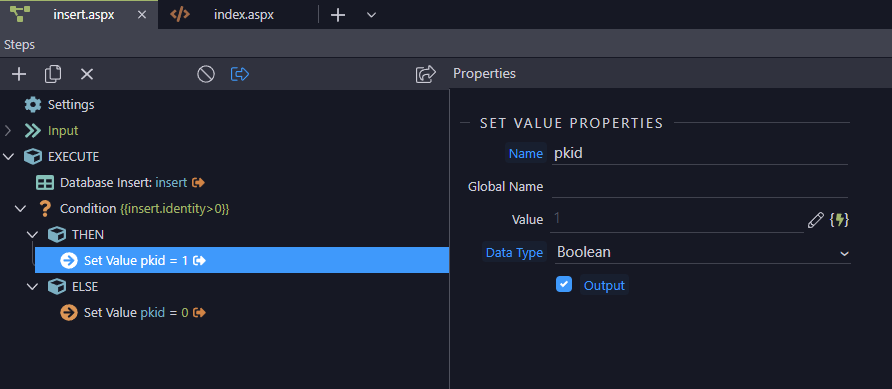
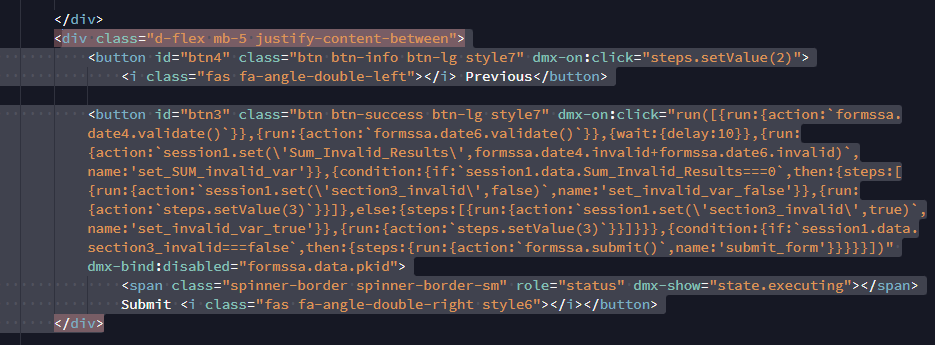
This solution is similar to what @bpj and @ben were suggesting.
My interpretation was to make and use a var bound to the db insert result (the Primary Key of the new record) which would then be bound to the button’s disabled “dynamic attribute”.
This worked but I’ve not tested for what would happen if the db insert fails–not sure how Wappler would interpret that result or if that would break the app.
Like I said, this works but all of this inline flow business really worries me–maintaining this looks nightmarish. Is there a way to separate this"flow" into a separate piece of code stored in a different area which could then be bound to the button? Seems like that would be easier to locate, maintain, etc. (I’m coming from an MVC/MVVM background)
I’m commenting the way Ben suggested to do this, as in my opinion it’s the best way to disable the submit button in your case.
Also, usually you use the submit button to only submit the form, without any other actions bound to it, not sure why do you need/use these inline flows for? Seems like quite an overcomplicated solution.
The flow is to validate & set vars since there is no submit button…
I agree it’s too complicated but I see no other way to make a from with muliple sections work as I want it to: separate validation checks for each section so the user would only need to fix any errors in one section before being allowed to continue to the next section.
Forcing a user to fix lots of errors in a single long complicated form would be bad.