Just tested and following Teodor’s advice
Description+'<HTML-HERE>'+FundingSource
does indeed work perfectly with the Allow HTML option checked.
Just tested and following Teodor’s advice
Description+'<HTML-HERE>'+FundingSource
does indeed work perfectly with the Allow HTML option checked.
Adding the HTML to the expression worked wonderfully. However, in the end I merged the description and funding column data into one column with HTML. The reason I took that extra step was so that I had more flexibility in the content. Adding it to the expression limited me to that exact structure of information while adding the HTML to the actual data instead gave me more flexibility on the content.
Wappler is fun! It’s a good Wappler day for me.
Trying to use tooltips in form fields. Am I correct in my conclusion that they will not work for Summernote textareas?
You cannot use tooltips in summernote.
Noted, thanks
@Teodor Any advice how to show repeat element in popover?
<td class="wills-policy-content d-flex justify-content-between align-items-center gap-2">
<span dmx-text="name"></span>
<i class="bi bi-people-fill text-info" dmx-show="beneficiaries.count()>0" dmx-bind:popover-title="'Beneficiaries and distribution'" data-bs-placement="top" data-bs-html="true" dmx-bs-popover="'<div dmx-repeat:repeat1="beneficiaries"> <p>{{fullName}}</p> </div>'"></i>
</td>
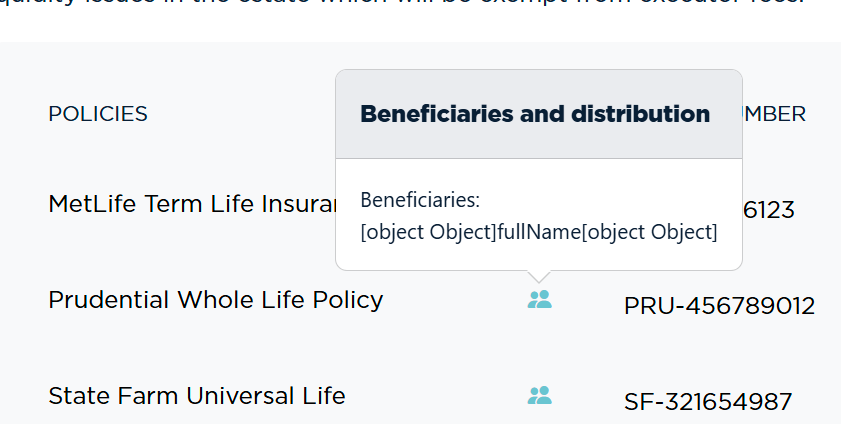
Looks like a valid code, but doesn't work.
Try
dmx-bs-popover="'Beneficiaries:<br>'+beneficiaries.join('fullName','<br>')"
dmx-bs-popover="beneficiaries.values('fullName')+' '+beneficiaries.values('distribution')+'%'"
but it not what I want to achieve.
I've tried to combine your solution with join with mine and I believe join is not working properly.
Can you share an example of the JSON data structure for beneficiaries?
"beneficiaries": [
	{
		"id": 3,
		"userWillPolicyID": 3,
		"fullName": "Emma Catherine Williams",
		"distribution": 50
	},
	{
		"id": 4,
		"userWillPolicyID": 3,
		"fullName": "James Alexander Thompson",
		"distribution": 30
	},
	{
		"id": 5,
		"userWillPolicyID": 3,
		"fullName": "Olivia Grace Martinez",
		"distribution": 20
	}
]
Try:
beneficiaries.values('fullName+\' \'+distribution+\'%\'').join('<br>')
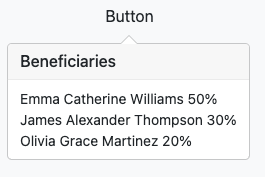
Much appreciate! Worked like a charm.